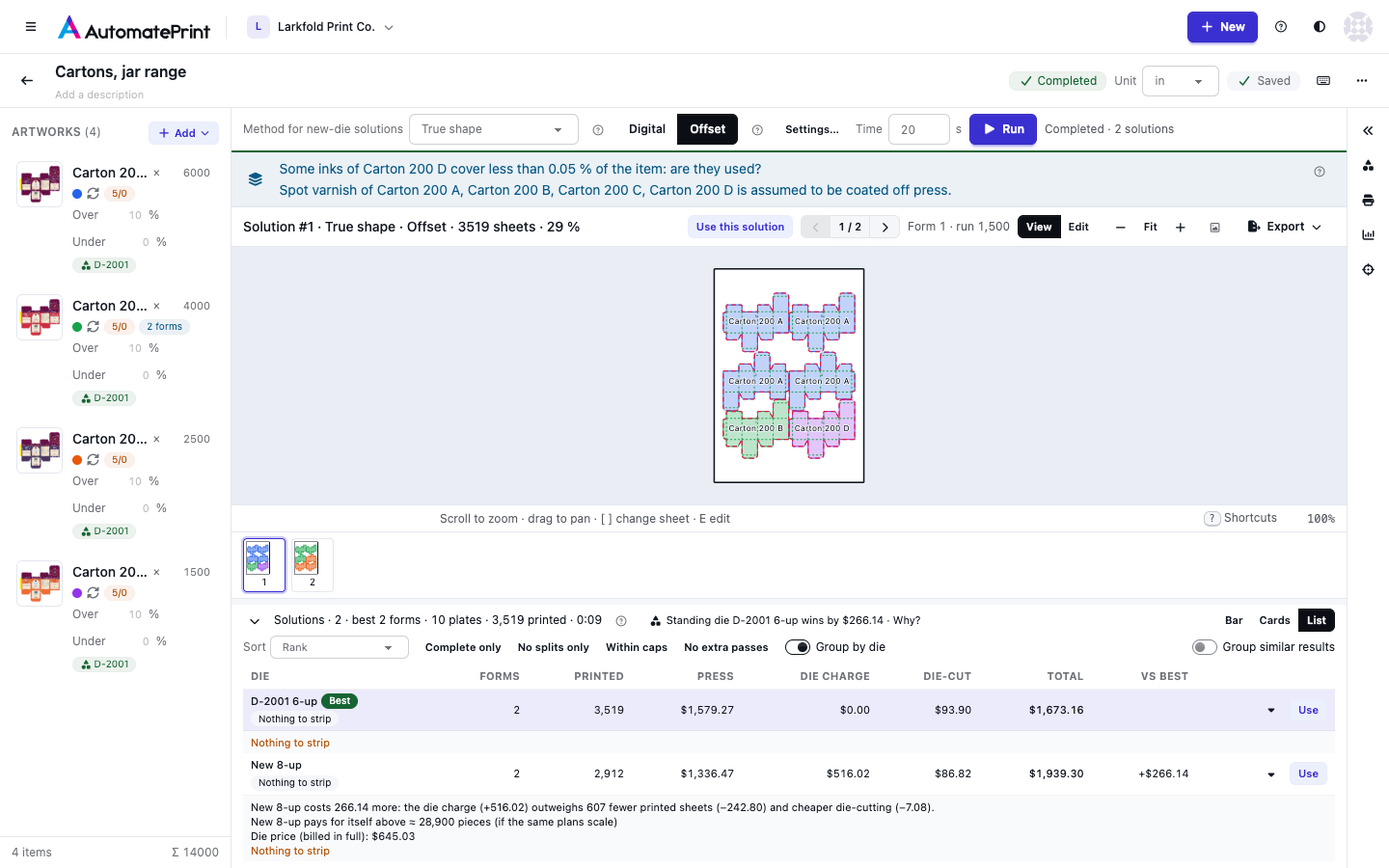
A standing die is a cutting die you already have. When the items of an offset job share a single-up dieline with a die on hand, the job can gang them on that die's fixed stations instead of laying out a new die, and it can compare that with new tooling on cost: press sheets, forms, the die charge and die-cutting together.
Die policy#
The Tooling card on the Production tab of an offset job picks how the run treats dies:
- Plan freely (no tooling comparison): the run lays items out as it always has, with no tooling comparison.
- Compare standing dies with new tooling: every die on hand that fits is planned and priced against new dies (and, for jobs with two or more different cartons, today's method), and the cheapest option is the default result.
- Use a standing die: the run must use a die on hand. Every usable die is tried, not only the one with the most ups; pick one in Die to force it. The method can't change: the stations are fixed by the die.
- New die only: only new dies (and today's method) are planned.
Jobs made before standing dies existed stay on Plan freely. A new offset job compares on its own only when a die on hand fits at least one item exactly; a banner says so ("D-2001 fits 4 of 4 items. Comparing it with new tooling.") with Plan freely instead. Otherwise the card shows the match and a Compare dies button and changes nothing. Match dies checks every item against the dies again (after you add a die, for example).
An item fits a die when its own die lines (or the library single-up you gave it) match a station's single-up: within the exact tolerance it is used at once; a near match is listed with its distance and used only after Use anyway, which holds until the item's die lines change. A confirmed near item runs on the die's stations: its cut may sit that far off the station's knife (the check that every cut is on its station allows the distance you confirmed). A mirrored fit never takes artwork. See Matching jobs to dies.
When Use a standing die forces a die that doesn't fit some items, the card says "2 of 6 items don't fit D-2001" (the forced die; "any die on hand" when every die that fits may be used) with a reason per item (near, mirrored, no die lines, several ups, or no die fits for items whose die lines match no die) and two actions: Use anyway (near matches) and Remove from job. The items left are planned separately on their own forms by today's method; items without die lines are cut on the table or a guillotine.
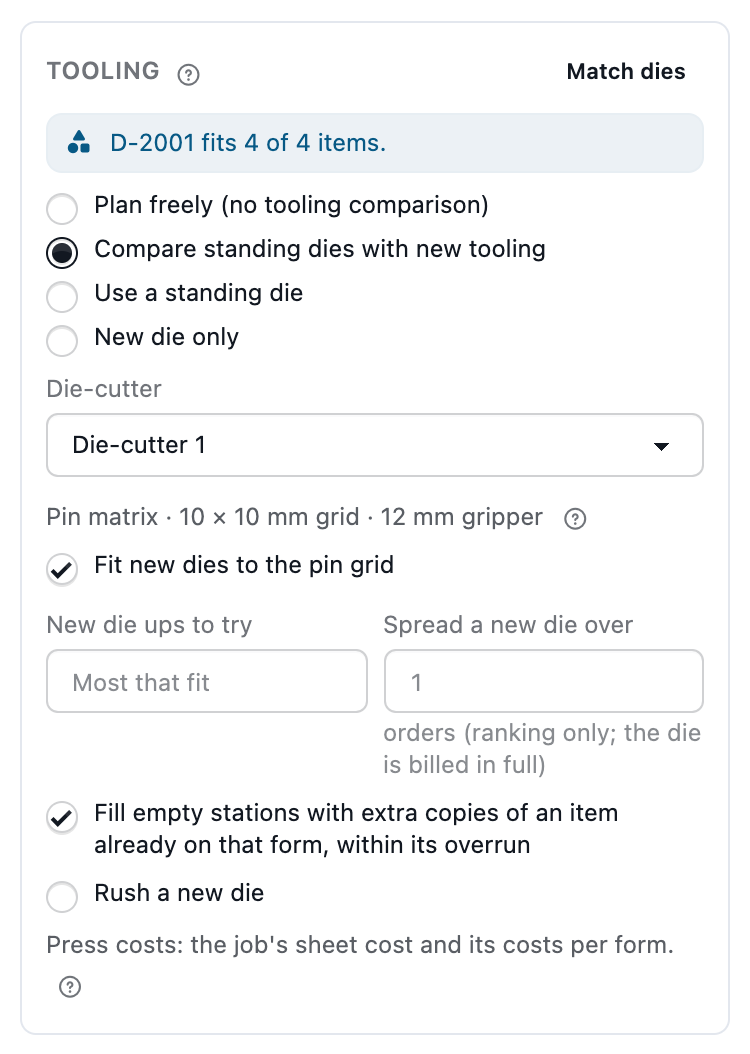
The card also holds the Die-cutter (the team's only die-cutter when you don't pick one), New die ups to try (extra sizes besides the most that fit), Spread a new die over N orders (ranking only), Fill empty stations (ticked as your team's tooling settings say until you change it for the job) and Rush a new die.
Gang on a standing die or compare#
To gang several items on a standing die, compare it with new tooling. A compare prices scenarios: each group of items that share a single-up goes on one die (a standing die, a new die with as many ups as fit, or today's method), and items without die lines are planned on their own forms. A combination die holding two different cartons is planned once for both, and also once per carton. Options show in Solutions with Group by die: forms, printed sheets, press money, the die charge, die-cutting, the total and how much more each costs than the best. Opening a row shows the cost breakdown, one sentence on why it costs more, the die's price (billed in full) and an approximate break-even ("pays for itself above ≈ 36,000 pieces", if the same plans scale). The bar above the solutions sums it up: "Standing die D-2001 6-up wins by 393.06 · Why?".
A new die identical to a standing one in stations and sheet plans exactly the same; it is folded under the die on hand with its extra charge. A new die's charge can be spread over several repeat orders for ranking only; the quote still bills the whole die. A compare plans at most 24 distinct solutions, and every group of items keeps at least one planned option; an option that can't beat the best one found, or that comes after the limit, is marked Not planned. With more than eight groups of items, each group gets its best die on its own (a combination die is still tried on all its cartons together). A scenario where some group couldn't be planned is listed after every complete one, without a total.
A compare never replaces the customer's own die: when an exclusive die owned by the job's customer fits, its option is listed first and is the default ("the customer's own die, already paid for"), even if a new die would cost less; the other options still show how they compare, and you can pick one with Use.
A die on hand is priced at nothing but the companions it lacks (a stripping or blanking tool). A new die is priced from your steel-rule rate card on its own rule: ups × the single-up's cut, crease and perforation, on the press sheet. Without a rate card it shows "— add a rate card" and can't be the best: its charge, total and difference from the best stay empty rather than showing a die at nothing.
Press costs#
Comparing dies needs press money: the job's sheet cost (the paper), and either a press whose rates work out the rest or costs per form entered on the job. A press with an hourly cost and a speed whose plates are priced (by a platemaker or the press's plate cost) gives a form = its plates at that price, plus the makeready time of its passes and plates, plus the job's extra cost per form; and a sheet = your sheet cost plus press time per sheet. When the job's inks are known the press's ink model prices the plates, makeready, wash-ups (per ink change) and press time per impression itself, so the form keeps only the extra cost and the sheet only the paper. Otherwise the entered costs are used, exactly as the planner uses them: per form the extra cost, the plate set cost when it prices the plates, and the forms' plates at the press's plate cost when the press prices them. The card shows which it uses. Without a sheet cost, or without a form cost and a press, Compare shows Press costs needed: paper is never counted as free. Use a standing die still runs without them and shows sheets and forms only.
Die-cutting in a comparison uses the job's die-cutter exactly as quotes do: its setup (plus stripping setup when it strips, and any speed factor on the stock's caliper) once per die mount, its speed and hourly cost per sheet fed, and its run and setup waste. Without a speed or an hourly cost, die-cutting is not costed. On a die-cutter with a pin matrix, every die option is also checked for stripping and priced with its cheapest stripping plan: see Pin-matrix stripping.
Per-item Over % and Under %#
On every offset job each item may have its own Over % and Under % in the item list; empty fields use the job's values, so a job without them plans exactly as before. An item at 0 % / 0 % gets its exact quantity.
Empty stations#
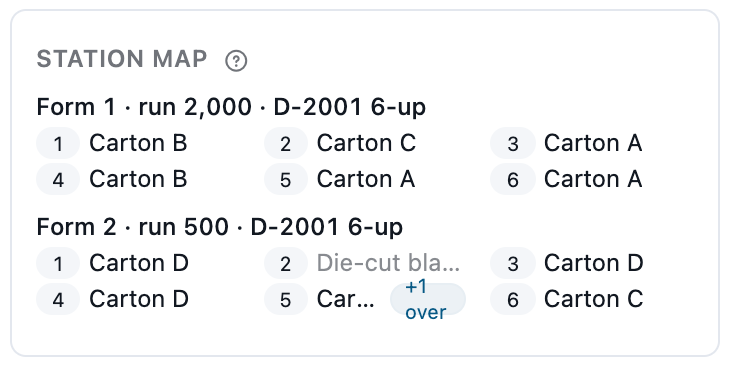
A die prints every station on every form. Fill empty stations with extra copies of an item already on that form, within its overrun adds copies only up to an item's explicit Over %; an item with no Over % limit is never filled. Stations left empty are die-cut blank. The sheet preview numbers every station, marks a fill copy "+1 over" and hatches blank stations; the selected solution's Station map lists each form's stations with their items.
Bleed, marks and exports#
On a die, each piece's bleed is clipped where it would print on a neighbour's piece, so interlocked flaps stay clean. The imposed PDF carries a Die layer with every station's rule, off by default so it never prints. The die can't move to make room for marks: they go in the gripper and tail margins, and a mark reaching a station shows Mark on a station. The export menu offers Die (CF2), the standing die's own file, beside the usual cut file. See Exports.
A gang import can name the die a quote was priced on (its tool number): the card shows "Quoted on: D-2001" and the job defaults to Use a standing die on that die (the Die select shows "The quoted die"); pick another die, or another policy, to change it. See Item properties.
Messages#
| Message | What it means |
|---|---|
| Press costs needed | Enter a sheet cost, and a form cost or a press. |
| Doesn't fit the die | An item fits no station of the die, or only mirrored (a mirrored station never takes artwork). |
| Needs more forms | The items need more forms than the job allows; raise the form count (up to 24 on a die). |
| Station under a mark | A station overlaps a marks area: with a fixed die, marks go in the gripper and tail margins. |
| Die for another sheet | The die is made for another sheet size (a die for the same sheet turned is fine); the job's sheet cost doesn't price that size, so its money stays empty and it can't be the best. |
| Needs a rate | A new die or another sheet size has no rate card or price; the option can't be the best. |
| Die doesn't mount | The die-cutter in use can't mount this die, or the job's press can't print its sheet size; it isn't planned. |
| Different sheet sizes | The dies of a scenario print on different sheet sizes. |
| Not planned | The option can't beat the best one found, or came after the compare's 24 solutions, so it wasn't planned. |
| Several ups in the artwork | The artwork's die lines hold more than one up. |
| No die fits | No die on hand fits these items. |
| Placed by trim box | The artwork has no die lines, so its library single-up was centred on its trim box; check it. |
| Mark on a station | A mark sits on a station. |
| Die-cutting not costed | Choose a die-cutter so die-cutting is priced. |
A worked example#
Example rates, not defaults: a 28 × 40 in sheet at 0.40, a form at 72.00, makeready 250 sheets, spoilage 3 %, at most 2 forms, Over 10 %; die-cutting 60.00 per mount and 0.016 per sheet. Four cartons of one shape, 6,000, 4,000, 2,500 and 1,500, with a 6-up die on hand:
| Option | Forms | Printed | Press | Die | Die-cut | Total |
|---|---|---|---|---|---|---|
| 6-up on hand | 2 | 2,920 | 1,312.00 | 0.00 | 97.34 | 1,409.34 |
| New 8-up | 2 | 2,318 | 1,071.20 | 643.20 | 88.00 | 1,802.40 |
The new 8-up prints 602 fewer sheets (−240.80) and costs 9.34 less to die-cut, but its die charge (+643.20) outweighs both at these quantities: it pays for itself above about 36,000 pieces. A new 6-up plans exactly like the die on hand and is folded under it ("a new copy of this die would cost 588.00").