

Every layout can be exported from the Export menu of the viewer toolbar or of the selected layout card on the Production tab. The ⋯ menu of a Report row has the imposed PDF and the PDF cut file of that row.
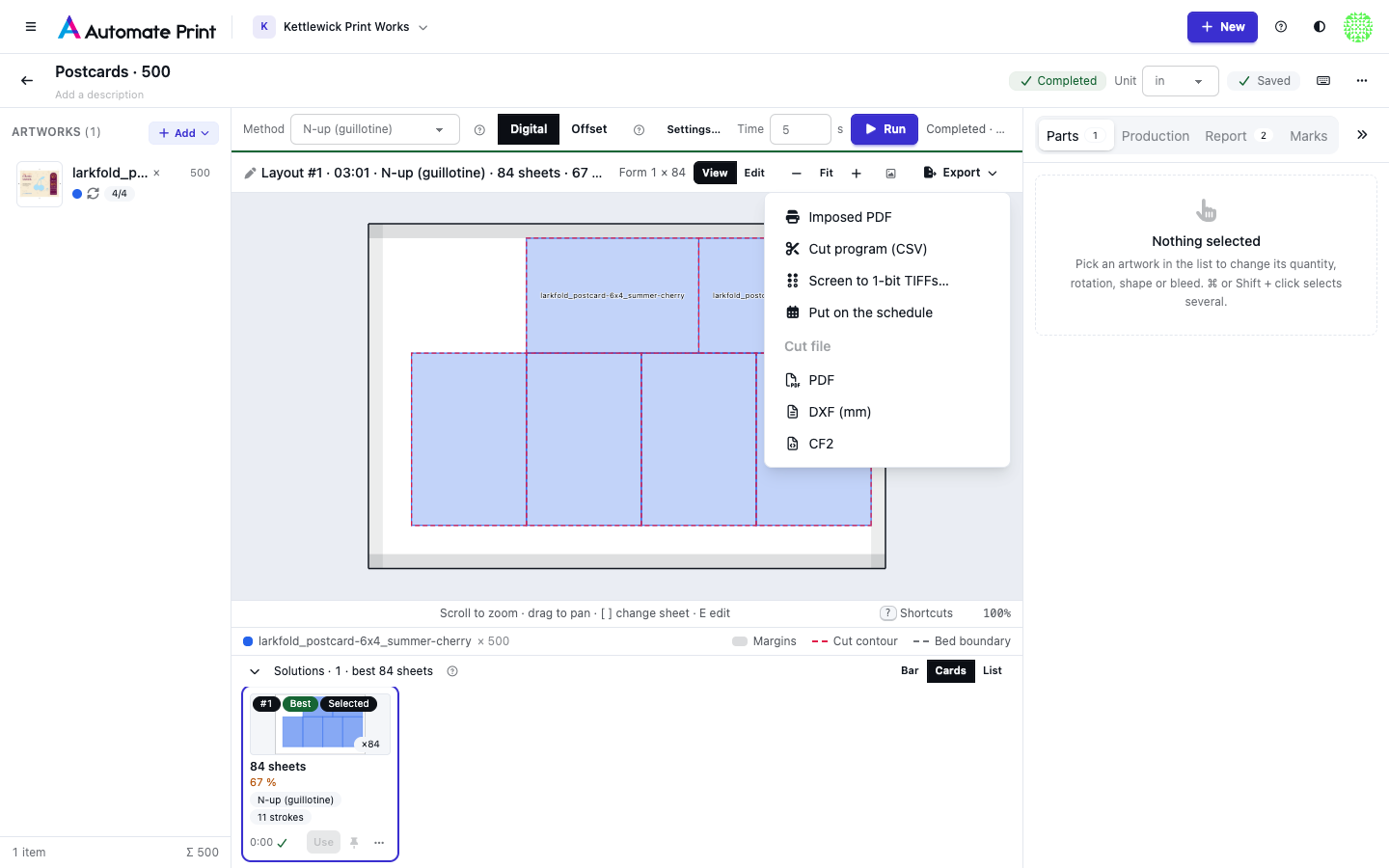
| Export | Format | For | What it holds |
|---|---|---|---|
| Imposed PDF | Every method | The artwork placed on the media: one page per form or plate (a roll: per bed, or every 200 in). | |
| Cut file | PDF, DXF or CF2 | Every method | The cut lines of every piece, named by cutting method. |
| Cut program (CSV) | CSV or JSON | N-up | The guillotine program: one row per knife step, per form. |
| Run sheet (CSV) | CSV | Offset plans | One row per plate and artwork: slots, run, makeready, printed and overrun. |
| Plate 1 PDF | Offset plans | One plate of the imposed PDF. | |
| Every method | Cut lines as spot colours and layers. | ||
| DXF (mm) | DXF | Every method | Cut lines in millimetres, one layer per method. |
| CF2 | CF2 | Every method | Cut lines for Esko and Kongsberg tables. |
| PDF, one page per bed | Roll jobs within beds | One page per cutter bed. |
Only a current layout exports: once the media or the artwork changed, the menu is greyed out with "This layout is out
of date: run again to export it". File names start with the job's name, the layout (such as layout-1, or edited-…
for a saved copy) and its sheet count or length.
Imposed PDF#
The Imposed PDF places every piece's artwork exactly where the layout put it, at full size, turned as placed and clipped to the piece's outline plus its bleed, so neighbours never paint over each other. The artwork comes from the print-ready file when one was made, else from the proof version it came from, else from the upload.
- Sheets: one page per form or plate, not per press sheet. A small label in the lower-left corner says which, such as "Form 2 × 84" or "Plate 1 · run 1,835", so the printer knows how many to run.
- Rolls: one page per bed when parts are kept within beds; otherwise one page, split every 200 in (the longest page a PDF allows), with a piece that crosses a split drawn on both pages.
On an offset plan the menu also lists Plate 1 PDF, Plate 2 PDF and so on: the same file, one plate at a time.
Cut program (CSV)#
N-up layouts add the Cut program (CSV): the knife program for the guillotine operator, one row per stroke.
| Column | Meaning |
|---|---|
form, copies |
The form and how many times it is printed. |
sheets_per_lift, lifts |
Sheets cut at once, and piles to cut. |
step |
The stroke's order within the form. |
pile |
The pile being cut: 1, then 1.1, 1.2 as piles split. |
rotate_deg |
The turn to give the pile before this stroke. |
back_gauge (in) |
The back gauge, in the job's display unit (the unit is in the header). |
action |
trim, separate or waste. |
stacked |
Identical piles cut together in this stroke. |
note |
"Not guillotine-cuttable: N pieces" on the first row of a form edited out of guillotine order. |
The API also gives the program as JSON, in points.
Run sheet (CSV)#
Offset plans add the Run sheet (CSV), one row per plate and artwork: plate, artwork, slots, run,
makeready, printed, produced, ordered and over_pct (the item's overrun).
Cut files#
The Cut file section of the menu writes the cut lines as PDF, DXF (mm) or CF2, and for roll jobs kept within beds, PDF, one page per bed. Strips layouts add their slits as open Thru-cut lines. What goes into these files, and how cutters read them, is on Cutting files and registration.
Print marks#
When mark sets apply to the job, the Imposed PDF shows how many marks it gets (+ 15 marks): they are drawn in their own Marks layer, and the file's other layers stay as they are. The cut files carry the registration marks on the cutter's registration layer, and Sheet N only downloads one sheet's cut file named from its sheet code. The marks are checked before a file is written; a problem that would ruin the run opens Marks block this export instead of saving a file. See Marks on a job.
Layouts with problems#
A layout you edited by hand may have pieces that overlap or sit too close. It still exports, but the menu warns: "Some pieces overlap or sit too close. Check the Parts tab before cutting."