

Each signature's flat sheet (its pages with their trims, grind-off and lip around them) is a block. Booklets places the blocks on the press sheet, decides how the sheet prints on both sides, and adds the marks the press room and the bindery need.
The press sheet#
Pick a Press from Equipment to take its largest sheet, its gripper, tail and side margins, whether it is offset or digital and whether it perfects; or type a Sheet width (along the gripper edge) and Sheet height. The gripper edge is at the bottom of the Sheet view. A Folder limits the signature size to what it folds; a Guillotine is checked against the sheet width.
Blocks are centred inside the printable area (Place blocks can set them against the gripper instead) and kept symmetric, so the back lines up with the front. Turn blocks turns them 90° to fit, or to run the grain along the spine when Grain is set.
Work styles#
| Work style | How it prints |
|---|---|
| Automatic | Work and turn or tumble when both sides of a signature fit one form; otherwise sheetwise (or perfecting on a perfecting press). Digital presses always print sheetwise. |
| Sheetwise | A front form and a back form; the sheet turns over left to right between them. |
| Perfecting | Both sides in one pass on a perfecting press; the back is seen turned head to foot. |
| Work and turn | One form holds both sides side by side; turned left to right, each sheet makes two copies. |
| Work and tumble | One form holds both sides one above the other; turned head to foot, two copies a sheet. |
On a work-and-turn form the Sheet view draws the turn axis down the middle; the two halves are the same signature's two sides, mirrored. The header counts forms and plate sets.
A Work style you choose that can't be used, because not even one pair of blocks fits the sheet that way, or because the press is digital, prints sheetwise instead, and the Checks say so for that form. Every page is still imposed.
Ups and cut and stack#
Ups is how many blocks go on each sheet (empty: as many as fit, up to 64). Ups filled with says what fills them:
- Repeat: copies of one signature; each sheet makes several (the default on offset).
- Cut and stack: different signatures, so that after cutting, the stacks go one on top of the other in order: stack 1 holds signatures 1, 2, 3…, stack 2 the next ones (the default on digital presses).
- Sequential: signatures in order across each sheet.
Web offset presses#
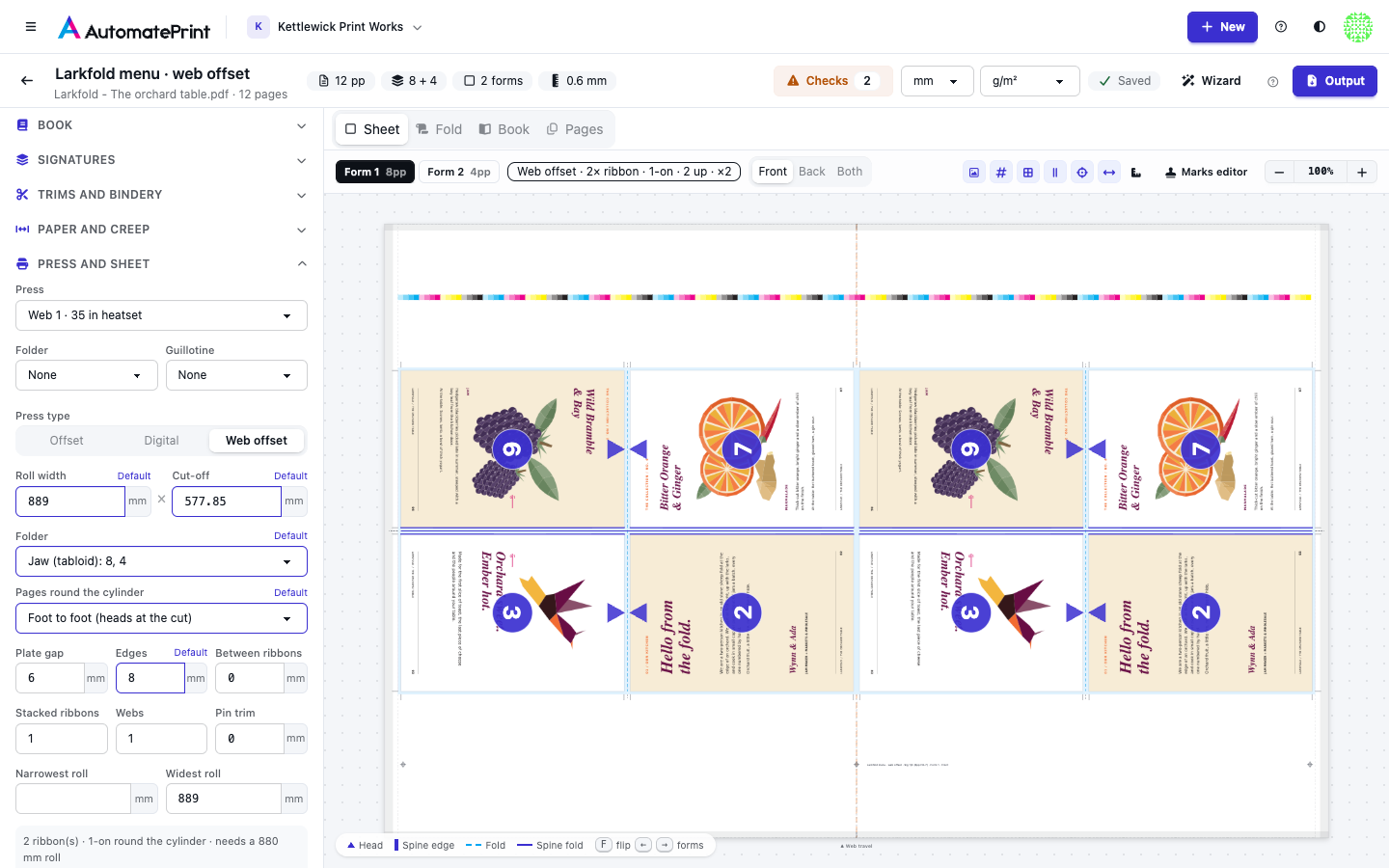
Set Press type to Web offset for a press that prints a roll (heatset or coldset web), or pick a web press from Equipment. A web form is not a sheet: it is the Roll width across by the Cut-off round the cylinder (the plate cylinder's circumference, fixed for the press). Both sides print in one pass, each with its own plates, and the folder at the end of the press slits, folds and cuts the web, so the signatures are the ones the folder delivers. Folder decides which: the largest one that fits the cut-off becomes the main signature, and the smaller ones take the remainder.
| Folder | Schemes, largest first | What it does |
|---|---|---|
| Chopper (quarter fold): 16, 8 (2-on), 4 | `F16-6`, `F8-1`, `F4-1` | Former, cut, jaw (parallel) fold, then a chopper fold along the web: the usual magazine 16-page. An 8-page signature runs 2-on (two round the cylinder) without the jaw fold. |
| Jaw (tabloid): 8, 4 | `F8-7`, `F4-1` | Former and one jaw fold: tabloid 8-page signatures, the pages lying across the web. |
| Double parallel (digest): 16, 8, 4 | `F16-13`, `F8-7`, `F4-1` | Former and two jaw folds: digest 16-page signatures, four pages round the cylinder. |
| Combination: 32, 16, 8, 4 | `F32-9`, `F16-6`, `F8-1`, `F4-1` | Former, jaw, a second parallel and the chopper: up to 32 pages when four rows fit round the cylinder (double-circumference presses), else as the chopper folder. |
| Former only (broadsheet): 4 | `F4-1` | The former fold only: 4-page broadsheet sections. |
- Every signature's first fold is the former fold, so its blocks always stand with that fold along the web; Turn blocks, Work style, Grain and Place blocks don't apply (the grain always runs along the web).
- Copies round the cylinder. As many copies of a block as fit go round the cylinder: a 16-page block of letter or A4 pages fills a 2-around cut-off once, and an 8-page signature runs 2-on, two to each cut-off. Blocks side by side across the web are ribbons: the web is slit between them, with Between ribbons trimmed out at each slit. Ups and Ups filled with work as on a sheet, so different signatures can share a cut-off.
- The cut-off is shared out evenly. The knife and the jaw folds are fixed on the cylinder, so the rows of pages divide the whole cut-off. Whatever the pages and trims don't need goes into the trim at the cut, so the head trim of a 16-page foot-to-foot signature is often much larger than its foot trim. A single row (2-on) shares it between its head and foot.
- Pages round the cylinder. With two rows of pages, the rows meet at the jaw fold Foot to foot (heads at the cut, where the knife, the pins and any spare cut-off are: the usual web choice) or Head to head (feet at the cut, the jaw fold closing the head, as sheetfed 16-page work). It only changes signatures whose pages stand in rows (the chopper and combination folders' 16 and 32 pages).
- No gripper. Plate gap is the non-printing band at each cut where the plates and blankets are locked up (0 on gapless sleeves): it must lie in paper that is trimmed off, so it is checked against the clear paper at the cut. On Automatic, a gap wider than the clear paper the largest signature leaves makes the plan fall back to a smaller one (8 pages instead of 16, say), which takes more cut-offs per copy: the Checks then say which scheme the gap ruled out, how many cut-offs per copy it costs, and what brings it back (a narrower gap, larger head and foot trims, or a longer cut-off). Edges is the non-printing band at each edge of the web.
- Pin folders. Pin trim is the paper a pin folder's pins take at each cut (0 for a pinless folder). The trim at the cut is never smaller: it is raised to the pin trim before the spare cut-off is added, so the pin holes are always trimmed off.
The Sheet view draws the form as the cut-off length of the roll, the web running up the screen, with a line on each slit between ribbons; the press-forms PDF has a page per form side at the roll width by the cut-off. Each form shows its ribbons, how many copies are on round the cylinder and the roll it needs. The Checks say when the folder doesn't make the scheme you chose, when the plate gap would cut into bleed (or made Automatic choose smaller signatures, and what that costs), when a narrower roll would do, when the roll is outside what the press takes, when fewer ribbons fit than you asked to stack, and when the pages are short for the cut-off (paper trimmed off at every cut).
Stacked ribbons and double webs#
A web press can make signatures bigger than one ribbon holds:
- Stacked ribbons. The web is slit into ribbons, and angle bars lay them on top of each other before the former, so they are folded together. With Stacked ribbons at 2 on a jaw folder, two 8-page ribbons come out of the folder as one 16-page product: the second ribbon's pages nest inside the first.
- Webs. A press with two or more webs prints them at the same time on their own units and combines them before the former. With Webs at 2, a chopper folder's two 16-page webs make a 32-page product.
Either way the product is made of parts that nest in each other: the ribbons of the first web, outside first, then the ribbons of the next web. The split works in products (fewer parts, or a smaller signature the folder makes, take the remainder), and Signatures lists each part with the product it belongs to. Each web gets a form of its own, with one part per ribbon and copies round the cylinder; the forms of one product print at the same time, so the header counts them as one press run, and cut-offs per copy counts each run once. Collating marks go on each product's outside part only, and creep counts every part's sheets, as in any nested signature.
The panel under the web settings sums up the form shown (ribbons, copies round the cylinder, which web), the products, press runs and cut-offs per copy, and the roll the form needs: Use a … mm roll sets it, never narrower than Narrowest roll. Narrowest roll and Widest roll come from the press (its min and max sheet width) and are only used for checks and this suggestion.
The wizard tries stacking 2 to 4 ribbons on a web press when it ranks the ways to print a booklet: fewer, bigger products usually mean fewer forms and plates.
On a web form the colour bar runs across the web in the paper trimmed off at the cut (the top of each form), the registration targets and the slug sit in the trim at the other cut, and short ticks at both cuts mark each slit.
Digital web presses#
An inkjet or toner press on a roll with a folder (an HP PageWide, Canon ProStream or Kodak Prosper, for example) lays out book signatures like a web offset press: the signatures its Web folder delivers, ribbons across the roll, its Max sheet width as the roll. Pick it as the booklet's press and the web settings fill in with Printing set to Digital (inkjet or toner, no plates):
| Setting | What it does |
|---|---|
| Printing | Offset (plates) or Digital (inkjet or toner, no plates). Digital forms count no plates, and the plate-gap fallback never applies. |
| Page repeat | Digital only. Fixed (the cut-off): the press's Cut-off (mm), its folder's page repeat. Variable (what the signatures need): the cut-off is one copy of the main signature's folded sheet along the web, plus the Plate gap band at each cut, so no paper is trimmed off. A press without a cut-off starts as variable. |
| Sides | One pass (both sides at once): a perfecting or twin-engine press. Two passes (one engine): the roll runs again for the back, and the plan's summary counts two passes. The press's Duplex sets it. |
On a digital web the Plate gap is the press's non-printing band at the cut. The forms, the marks, the PDF and the JDF are the same as a web offset press's.
Bindery marks#
Choose them under Marks:
- Crop marks on every trim line of each block, outside it, Offset from trim clear of the trim.
- Fold marks, dashed, on every fold; the spine fold's are longer.
- Collating marks: a bar across the outside of the spine fold, a Collating step lower for each gathered section, so the gathered book shows a staircase on its spine. Nested booklets don't get them: only the outer signature's spine shows.
- Registration targets in the free margins, a CMYK Colour bar and a Slug line with the booklet's name, its signatures, the form and the side.
Marks are drawn with the same renderer as other exports and go in their own Marks layer of the PDF, in registration ink (crop, fold and registration marks) or black. Ticks are shortened where they would run into a page's bleed, so blocks packed close together never mark each other.
To add other marks (a job ticket line, a QR code, a target in a particular place), or the mark sets you use on a press, open the Marks editor on the Sheet view: see The booklet marks editor.
Downloading the PDF#
Output in the header downloads the forms: one PDF, a PDF per form or per side, or a JDF package for your RIP, named as you choose (see Booklet output: PDF and JDF). For each form the PDF has its front, then its back (a work-and-turn or work-and-tumble form is one page: the same plate prints both sides). Backs are drawn as the side looks when printed: turned left to right, or head to foot for tumble and perfecting. Every page keeps its artwork's vector content and layers.
A separate cover adds its own press form at the end (see Press sheets and bindery marks); when not one cover fits its sheet, two bare spread pages instead.
The cover form#
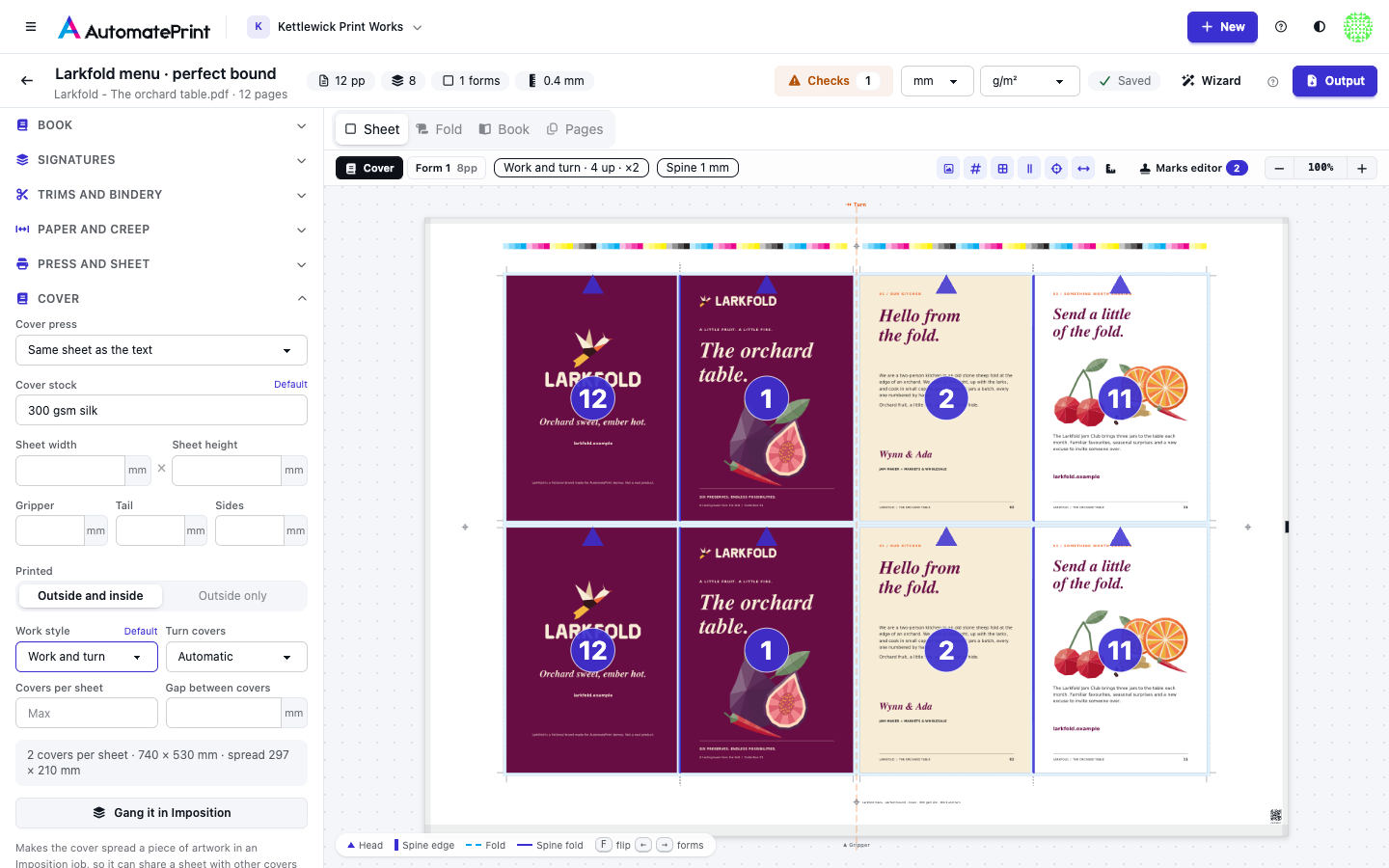
A separate cover is a spread: back cover, spine and front cover (front, spine, back when the book reads right to left). A perfect-bound cover's spine is the book block's thickness plus two cover thicknesses; a saddle-stitched cover folds on one line. The cover usually prints on another stock and often another press, so it gets a press form of its own: on the Sheet view, pick Cover next to the forms. Its settings are under Cover in the settings panel (shown only for a separate cover):
- Cover press takes the sheet, margins and press type from one of your presses; or set Sheet width, Sheet height, Gripper, Tail and Sides yourself. Blank fields use the text's sheet.
- Cover stock names the stock; it goes in the slug.
- Printed: outside and inside (4/4), or the outside only (4/0).
- Work style: Sheetwise prints the outsides on the front and the insides on the back, each behind its own outside. Work and turn puts half the outsides on one half of the sheet and their insides, mirrored, on the other, so each sheet makes two of every cover. Automatic uses work and turn on offset when the covers pair up across the sheet, sheetwise otherwise.
- Covers per sheet (0: as many as fit), Gap between covers (twice the bleed by default, so neighbouring bleeds never overlap) and Turn covers (upright, turned 90° or whichever fits more).
The front and back covers' artwork bleeds into the spine up to its middle, never further, so on a spine narrower than two bleeds neither panel's bleed reaches the other side.
Each cover gets crop marks at its corners and score marks at both spine edges, plus the registration marks, colour bar and slug of any form. The Checks say when the cover spread doesn't fit its sheet, or fewer covers fit than you asked for.
Ganging covers with other work#
Covers on the same stock can share a sheet with other covers and flats. Gang it in Imposition (under Cover) saves the cover spread to Files as a PDF (the outside, then the inside unless it prints 4/0, each with its bleed and a trim box) and adds it to a new Imposition job as a front-and-back item, on the cover press's sheet, with the stock in the job's description. Add the other work to that job and run it as usual: see Ganging rules: what may share a form.