

Products and finishing make repeat work fast. A product is a saved line: pick "Postcard" and the row fills in its usual size, quantity, route, stock and inks. A finishing operation is something done to a part after printing, with its own price.
Products#
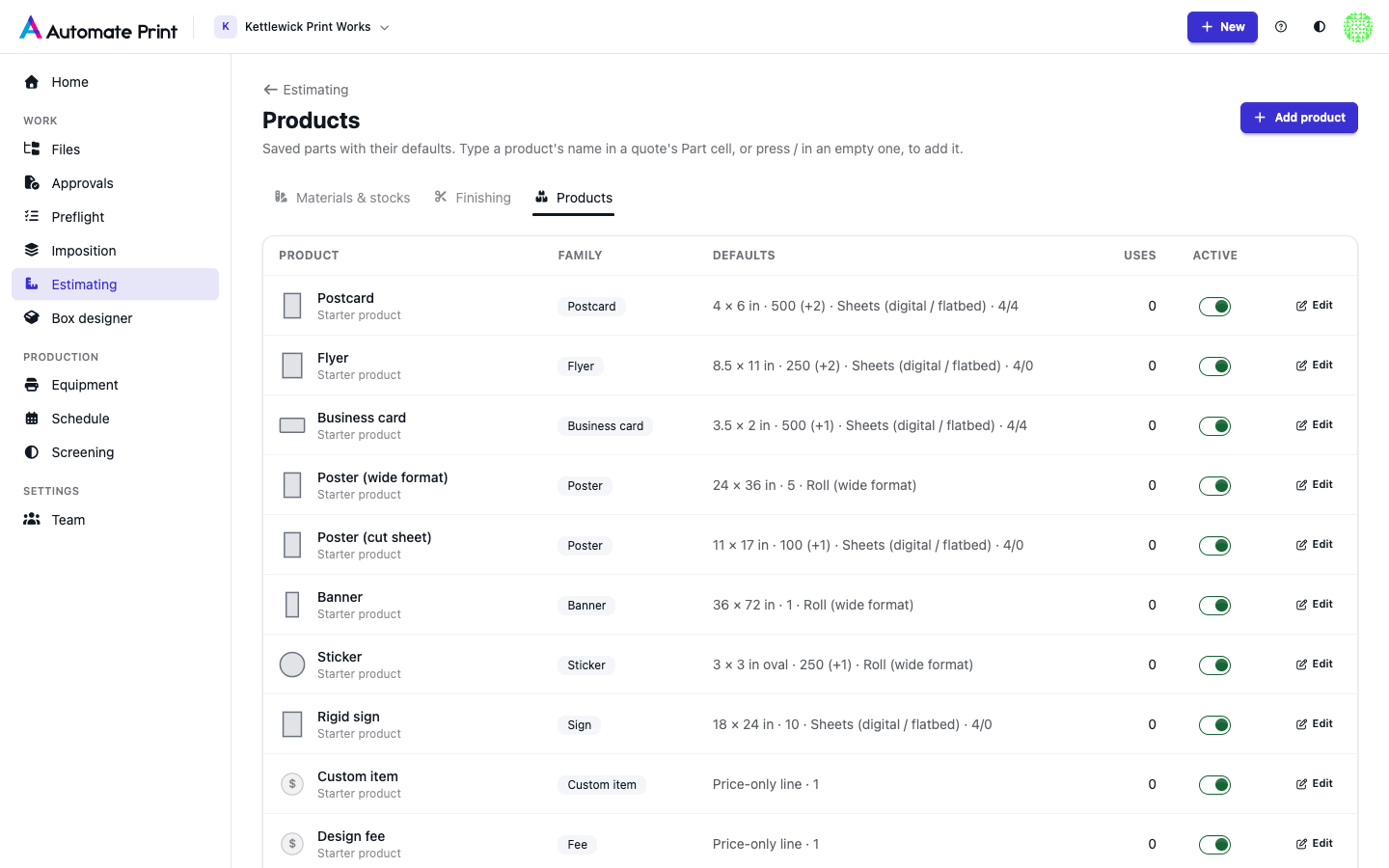
A new team gets a starter set: Postcard, Flyer, Business card, Poster (wide format), Poster (cut sheet), Banner, Sticker, Rigid sign, Custom item, Design fee, and the box products (Tuck box on Offset, die-cut with the die as a separate one-off; Tuck box, short run and Straight tuck box, short run on the cutting table; Tray; Shipping box on the flexo folder-gluer, one colour, bundled). They carry sizes and quantities, never prices. A box product also keeps how the box is made (see Cartons and boxes). Save as product on any line keeps its settings for next time.
To use a product, type its name in an empty Part cell and pick it from the list, press / in an empty Part cell (or
⌘K) for the picker, or click one of the chips of an empty quote. The picker lists Blank part and Custom price
line first, then your recent products, then all of them. A product whose stock you don't have yet leaves the stock
empty with Add suggested stock: add it, give it your price, and the line prices.
The Products tab of the price book lists every product with its family, its defaults and how often it's used. Add product or Edit opens the same settings a line has:
| Setting | What it does |
|---|---|
| Name, Family | How it appears in the picker. The family (Postcard, Flyer, Business card, Poster, Banner, Sticker, Sign, Custom item, Fee, Folding carton, Corrugated box, Booklet or Roll labels) also picks the size presets offered first. Booklet and roll-label products don't price pages, bindings or rolls yet: type their price by hand. |
| Price-only line | A line with no size or stock (a fee, outsourced work), priced by hand on the Custom price route. |
| Shape, Width, Height, Corner radius | The size a new line starts with. The shape is Rectangle, Rounded rectangle (with its corner radius), Oval or Box (dieline) for a box. |
| Box style | For the shape Box (dieline): the style a new line's Box designer opens on (required for a box product). The box's size is set on each quote. |
| Quantity, Also quote at | The ordered quantity and up to three more to compare. |
| Route, Stock or material, Sides | How it's produced. A stock that can't run on the route is refused. |
| Finishing | Operations added to every new line. |
| Price each, Cost each | Leave empty to price from the stock and equipment; set them for a price-only line or a fixed price. |
| Order in the picker | Lower numbers come first. |
Turning off Active archives a product: it leaves the picker, and starter products you archive are never added back.
Finishing#
Each operation is priced per piece, per 1,000 pieces, per sheet, per ft² or m², per linear foot or metre of perimeter, each (grommets every 24 in, at least four), or once per job, with a setup charge and a minimum. Fold entries also carry the fold style. Boxes are bundled and palletised with the Bundle & strap (25 a bundle) and Pallet & wrap (500 a pallet) presets, priced per bundle or pallet.
The Finishing tab of the price book lists your operations. Each has:
| Setting | What it does |
|---|---|
| Name, Category | Coating, lamination, cutting, folding, drilling, mounting, hardware, packing, fee, other, or outside work (a vendor's charge: quotes show it apart from your own finishing). |
| Priced | The unit above, or per pack (bundles, cases, pallets) or per 1,000 in². "Per sheet" is only for the Sheets and Offset routes. |
| Pieces per pack | For "per pack": how many pieces fill one pack, for example 25 boxes a bundle. A line's count overrides it. |
| Timed on | Optional: a machine from Equipment → Finishing. The operation is then timed at that machine's speed and rates, and the prices above are added on top. Items, Custom price lines and boxes on Blanks as board only can't take a timed operation. A machine archived later keeps timing it (shown as "archived" here). Until its time is priced, the line shows as pending, never at $0; a machine with no speed or rate says so in Ready to quote. |
| Routes | Which routes offer it; leave all unticked for every route. |
| Price per unit, Setup price, Minimum charge | What the customer pays: units × price, plus setup, and never less than the minimum. |
| Cost per unit, Setup cost | What it costs you. Customers never see it. |
| Count per piece, One every (in of perimeter), At least | For "each" units: a fixed count (1 H-stake per sign), or one every N inches around the edge with a minimum (grommets). |
| Coating | Parts with a coating are ganged only with parts that have it too. |
On a line, click the Finishing cell (or press Enter on it) to tick operations; an "each" operation takes a count, and
a folding one a Style (half, letter, Z, gate, double parallel, roll or 4-panel accordion). When a fold is added on
a stock at least 0.010 in thick, the popover offers Add Score (recommended for cover weights).
Presets without prices#
Stock and finishing presets hold typical technical values only. A row made from a preset starts at $0 and shows "Set a price" until you give it yours: the app never prices a quote at someone else's rates. On the Finishing tab, Add from presets lists the typical operations you haven't added yet (UV and aqueous coating, gloss laminate, round corners, score, fold, drill, shrink-wrap, grommets, hem, mount to board, H-stakes, design and rush fees); an operation you archived is never added again.