

A folding scheme says how a flat sheet folds into a signature. Booklets knows every scheme of the JDF fold catalog and folds your own.
The JDF catalog#
The catalog names schemes like F16-7: 16 pages, the 7th way to fold them. Booklets folds each scheme's sheet by
its fold sequence and numbers the pages from the result, the way JDF does. For the 86 schemes the JDF 1.8
specification draws as pagination diagrams, the page numbers, sides and head directions match those diagrams
exactly. JDF numbers the pages so that page 1 is sometimes on the back of the flat sheet; Booklets keeps that.
F6-3, F6-6 and F6-7 have panels of different widths; they are listed in the catalog but can't be used.
Saddle-ready schemes join every leaf at the spine, so they can be stitched through the fold. A scheme that isn't saddle-ready can still be perfect bound.
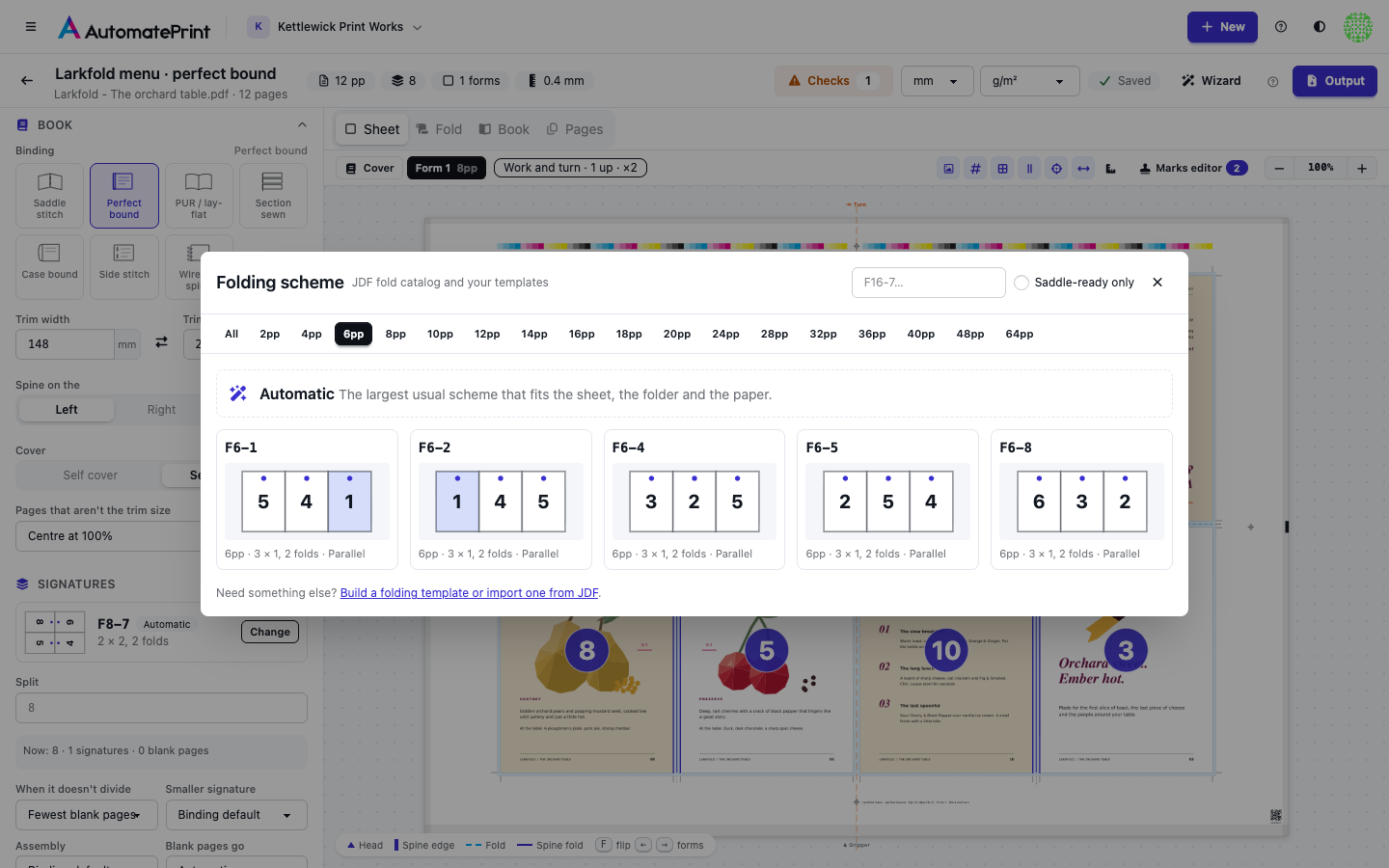
In the editor, Change next to the scheme opens the catalog with a diagram of each scheme's front: the dot marks each page's head and the tinted cell is page 1. Automatic picks the largest usual scheme (F4-1, F8-7, F16-7, F32-9 or F64-1) that fits the press sheet, the folder and the paper. Digital presses get F4-1: booklet makers fold once.
| Scheme | Pages | Grid | Folds | Notes |
|---|---|---|---|---|
| `F2-1` | 2 | 1 × 1 | – | usual choice |
| `F4-1` | 4 | 2 × 1 | ↕1↑ | usual choice, saddle-ready |
| `F4-2` | 4 | 2 × 1 | ↕1↓ | saddle-ready |
| `F6-1` | 6 | 3 × 1 | ↕1↑ ↕1↓ | – |
| `F6-2` | 6 | 3 × 1 | ↕1↓ ↕1↑ | – |
| `F6-4` | 6 | 3 × 1 | ↕1↑ ↕1↑ | – |
| `F6-5` | 6 | 3 × 1 | ↕2↑ ↕1↓ | – |
| `F6-8` | 6 | 3 × 1 | ↕2↑ ↕1↑ | – |
| `F8-1` | 8 | 4 × 1 | ↕2↑ ↕1↑ | saddle-ready |
| `F8-2` | 8 | 4 × 1 | ↕2↑ ↕1↓ | saddle-ready |
| `F8-3` | 8 | 4 × 1 | ↕1↑ ↕1↓ ↕1↑ | saddle-ready |
| `F8-4` | 8 | 4 × 1 | ↕1↑ ↕2↑ ↕1↓ | – |
| `F8-5` | 8 | 4 × 1 | ↕1↑ ↕1↑ ↕1↑ | saddle-ready |
| `F8-6` | 8 | 4 × 1 | ↕3↑ ↕1↓ ↕1↓ | saddle-ready |
| `F8-7` | 8 | 2 × 2 | ↕1↑ ↔1↑ | usual choice, saddle-ready |
| `F10-1` | 10 | 5 × 1 | ↕1↑ ↕1↓ ↕1↑ ↕1↓ | – |
| `F10-2` | 10 | 5 × 1 | ↕4↑ ↕1↓ ↕1↓ ↕1↓ | – |
| `F10-3` | 10 | 5 × 1 | ↕2↑ ↕2↓ ↕1↑ | – |
| `F12-1` | 12 | 6 × 1 | ↕2↑ ↕2↓ ↕1↑ | saddle-ready |
| `F12-2` | 12 | 6 × 1 | ↕2↑ ↕2↑ ↕1↓ | saddle-ready |
| `F12-3` | 12 | 6 × 1 | ↕3↑ ↕1↓ ↕1↑ | saddle-ready |
| `F12-4` | 12 | 6 × 1 | ↕3↑ ↕1↓ ↕1↓ | saddle-ready |
| `F12-5` | 12 | 6 × 1 | ↕3↑ ↕2↓ ↕1↑ | – |
| `F12-6` | 12 | 6 × 1 | ↕1↑ ↕1↓ ↕1↑ ↕1↓ ↕1↑ | saddle-ready |
| `F12-7` | 12 | 3 × 2 | ↕1↑ ↕1↓ ↔1↑ | saddle-ready |
| `F12-8` | 12 | 3 × 2 | ↕2↑ ↕1↑ ↔1↑ | saddle-ready |
| `F12-9` | 12 | 3 × 2 | ↕1↑ ↕1↑ ↔1↑ | saddle-ready |
| `F12-10` | 12 | 3 × 2 | ↕2↑ ↕1↓ ↔1↑ | saddle-ready |
| `F12-11` | 12 | 3 × 2 | ↕1↑ ↔1↑ ↕1↑ | – |
| `F12-12` | 12 | 2 × 3 | ↕1↑ ↔2↑ ↔1↓ | – |
| `F12-13` | 12 | 2 × 3 | ↕1↑ ↔1↑ ↔1↑ | – |
| `F12-14` | 12 | 2 × 3 | ↕1↑ ↔1↑ ↔1↓ | – |
| `F14-1` | 14 | 7 × 1 | ↕1↑ ↕1↓ ↕1↑ ↕1↓ ↕1↑ ↕1↓ | – |
| `F16-1` | 16 | 8 × 1 | ↕4↑ ↕2↓ ↕1↑ | saddle-ready |
| `F16-2` | 16 | 8 × 1 | ↕4↑ ↕2↓ ↕1↓ | saddle-ready |
| `F16-3` | 16 | 8 × 1 | ↕4↑ ↕2↑ ↕1↓ | saddle-ready |
| `F16-4` | 16 | 8 × 1 | ↕4↑ ↕2↑ ↕1↑ | saddle-ready |
| `F16-5` | 16 | 8 × 1 | ↕1↓ ↕1↑ ↕1↓ ↕1↑ ↕1↓ ↕1↑ ↕1↓ | saddle-ready |
| `F16-6` | 16 | 4 × 2 | ↕2↑ ↔1↑ ↕1↑ | saddle-ready |
| `F16-7` | 16 | 4 × 2 | ↕2↑ ↔1↑ ↕1↓ | usual choice, saddle-ready |
| `F16-8` | 16 | 4 × 2 | ↕2↑ ↔1↓ ↕1↓ | saddle-ready |
| `F16-9` | 16 | 4 × 2 | ↕2↑ ↕1↓ ↔1↑ | saddle-ready |
| `F16-10` | 16 | 4 × 2 | ↕2↑ ↕1↑ ↔1↑ | saddle-ready |
| `F16-11` | 16 | 4 × 2 | ↕1↑ ↕1↓ ↕1↑ ↔1↑ | saddle-ready |
| `F16-12` | 16 | 4 × 2 | ↕1↑ ↕1↑ ↕1↑ ↔1↑ | saddle-ready |
| `F16-13` | 16 | 2 × 4 | ↕1↑ ↔2↑ ↔1↓ | saddle-ready |
| `F16-14` | 16 | 2 × 4 | ↕1↑ ↔2↑ ↔1↑ | saddle-ready |
| `F18-1` | 18 | 9 × 1 | ↕1↑ ↕1↓ ↕1↑ ↕1↓ ↕1↑ ↕1↓ ↕1↑ ↕1↓ | – |
| `F18-2` | 18 | 9 × 1 | ↕6↑ ↕3↓ ↕1↑ ↕1↓ | – |
| `F18-3` | 18 | 9 × 1 | ↕3↑ ↕3↓ ↕2↑ ↕1↓ | – |
| `F18-4` | 18 | 9 × 1 | ↕3↑ ↕3↓ ↕1↑ ↕1↓ | – |
| `F18-5` | 18 | 3 × 3 | ↕1↑ ↕1↓ ↔1↑ ↔1↓ | – |
| `F18-6` | 18 | 3 × 3 | ↕1↑ ↕1↓ ↔2↑ ↔1↓ | – |
| `F18-7` | 18 | 3 × 3 | ↕1↑ ↕1↑ ↔1↑ ↔1↓ | – |
| `F18-8` | 18 | 3 × 3 | ↕1↑ ↕1↑ ↔2↑ ↔1↓ | – |
| `F18-9` | 18 | 3 × 3 | ↕2↑ ↕1↑ ↔2↑ ↔1↑ | – |
| `F20-1` | 20 | 5 × 2 | ↕2↑ ↕2↓ ↕1↑ ↔1↑ | saddle-ready |
| `F20-2` | 20 | 5 × 2 | ↕1↑ ↕1↓ ↕1↑ ↕1↓ ↔1↑ | saddle-ready |
| `F24-1` | 24 | 6 × 2 | ↕2↑ ↕2↓ ↔1↑ ↕1↑ | saddle-ready |
| `F24-2` | 24 | 6 × 2 | ↕2↑ ↕2↑ ↔1↑ ↕1↑ | saddle-ready |
| `F24-3` | 24 | 6 × 2 | ↕2↑ ↕2↓ ↕1↑ ↔1↑ | saddle-ready |
| `F24-4` | 24 | 6 × 2 | ↕2↑ ↕2↓ ↕1↓ ↔1↑ | saddle-ready |
| `F24-5` | 24 | 6 × 2 | ↕2↑ ↕2↑ ↕1↓ ↔1↑ | saddle-ready |
| `F24-6` | 24 | 6 × 2 | ↕1↑ ↕1↓ ↕1↑ ↕1↓ ↕1↑ ↔1↑ | saddle-ready |
| `F24-7` | 24 | 6 × 2 | ↕2↑ ↔1↑ ↕2↑ ↕1↓ | saddle-ready |
| `F24-8` | 24 | 3 × 4 | ↕1↑ ↕1↓ ↔2↑ ↔1↓ | saddle-ready |
| `F24-9` | 24 | 3 × 4 | ↕2↑ ↕1↑ ↔2↑ ↔1↓ | saddle-ready |
| `F24-10` | 24 | 3 × 4 | ↕1↑ ↕1↑ ↔2↑ ↔1↓ | saddle-ready |
| `F24-11` | 24 | 4 × 3 | ↕2↑ ↔2↑ ↔1↓ ↕1↑ | saddle-ready |
| `F28-1` | 28 | 7 × 2 | ↕1↑ ↕1↓ ↕1↑ ↕1↓ ↕1↑ ↕1↓ ↔1↑ | saddle-ready |
| `F32-1` | 32 | 16 × 1 | ↕8↑ ↕4↓ ↕2↑ ↕1↓ | saddle-ready |
| `F32-2` | 32 | 8 × 2 | ↕4↑ ↕2↓ ↔1↑ ↕1↑ | saddle-ready |
| `F32-3` | 32 | 8 × 2 | ↕4↑ ↕2↓ ↔1↑ ↕1↓ | saddle-ready |
| `F32-4` | 32 | 4 × 4 | ↕2↑ ↔2↑ ↕1↑ ↔1↑ | saddle-ready |
| `F32-5` | 32 | 4 × 4 | ↕2↑ ↔2↑ ↕1↓ ↔1↓ | saddle-ready |
| `F32-6` | 32 | 4 × 4 | ↕2↑ ↔2↑ ↕1↑ ↔1↓ | saddle-ready |
| `F32-7` | 32 | 4 × 4 | ↕1↑ ↕1↓ ↕1↑ ↔2↑ ↔1↓ | saddle-ready |
| `F32-8` | 32 | 4 × 4 | ↕2↑ ↕1↓ ↔2↑ ↔1↓ | saddle-ready |
| `F32-9` | 32 | 4 × 4 | ↕2↑ ↔2↑ ↔1↓ ↕1↑ | usual choice, saddle-ready |
| `F36-1` | 36 | 9 × 2 | ↕3↑ ↕3↓ ↕1↑ ↕1↓ ↔1↑ | saddle-ready |
| `F36-2` | 36 | 6 × 3 | ↕2↑ ↕2↓ ↔1↑ ↔1↓ ↕1↑ | saddle-ready |
| `F40-1` | 40 | 5 × 4 | ↕1↑ ↕1↓ ↕1↑ ↕1↓ ↔2↑ ↔1↓ | saddle-ready |
| `F48-1` | 48 | 6 × 4 | ↕2↑ ↕2↓ ↔1↑ ↔1↓ ↔1↑ ↕1↑ | saddle-ready |
| `F48-2` | 48 | 4 × 6 | ↕1↑ ↕1↓ ↕1↑ ↔2↑ ↔2↓ ↔1↑ | saddle-ready |
| `F64-1` | 64 | 8 × 4 | ↕4↑ ↔1↑ ↔1↓ ↔1↑ ↕2↑ ↕1↓ | usual choice, saddle-ready |
| `F64-2` | 64 | 8 × 4 | ↕2↑ ↕2↓ ↕2↑ ↔1↑ ↔1↓ ↔1↑ ↕1↑ | saddle-ready |
How the pages become signatures#
When the page count doesn't fill whole signatures of the scheme, the rest goes into smaller ones (8 and 4 pages by default) or blank pages are added. When it doesn't divide chooses how:
- Fewest blank pages: the fewest signatures for the fewest blanks. One more signature counts as much as five blank pages, so 36 pages become 16 + 16 + 4 and 46 pages become 16 + 16 + 16 with 2 blanks.
- Fewest signatures: whole signatures of the scheme, with the blanks that takes.
- Equal signatures: signatures of about the same size.
Under Split the editor shows the split it chose and any other split that trades signatures for blank pages
(say, 16 + 8 + 4 + 16 with no blanks instead of 16 + 16 + 16 with 4); Use takes it. Split also sets the
signatures yourself, in book order, such as 16, 8, 16. Smaller signature says where a
smaller one goes: last (innermost when nested), first, or in the middle between full ones. Binders prefer the middle
for perfect-bound and sewn books, and the inside for saddle stitching.
Blank pages#
Blanks go before the last page (keeping the back cover last) for a self cover, and at the end when the cover is separate. Blank pages go can put them at the start or after the first page instead. Every added blank is listed on the Pages view and counted in the checks.
Nesting and gathering#
Gathering and nesting decide which pages each signature carries:
- Nest: each signature sits inside the one before (saddle stitching). The outer signature carries the first and the last pages.
- Gather: signatures stack spine to spine; each carries the next run of pages.
- Nest, then gather: a few signatures nested into each section (Nested per section), then the sections gathered, as for sewn books with small sections.
The binding sets the assembly; Assembly overrides it.
Custom pagination#
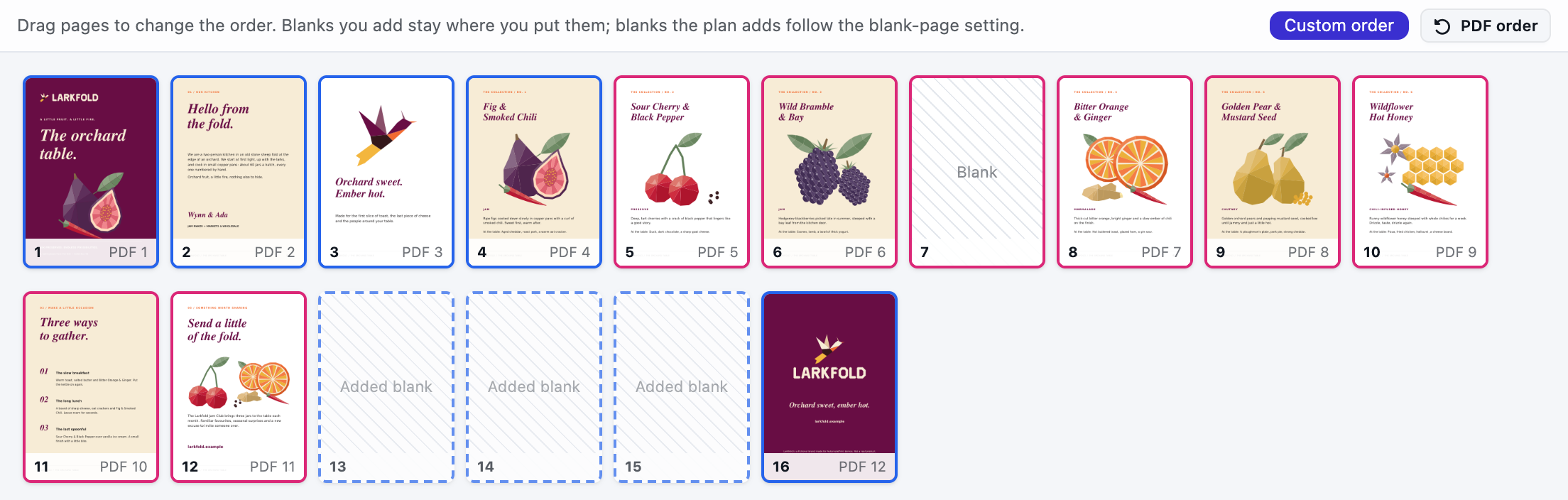
The Pages view shows the book in reading order, each page edged in its signature's colour. Drag a page to move it, use + to add a blank after a page and × to remove a blank you added. Blanks the plan adds to fill a signature are drawn dashed and follow Blank pages go. PDF order goes back to the PDF's own order. The order is saved as the booklet's page order (see Booklets API).
The folding template library#
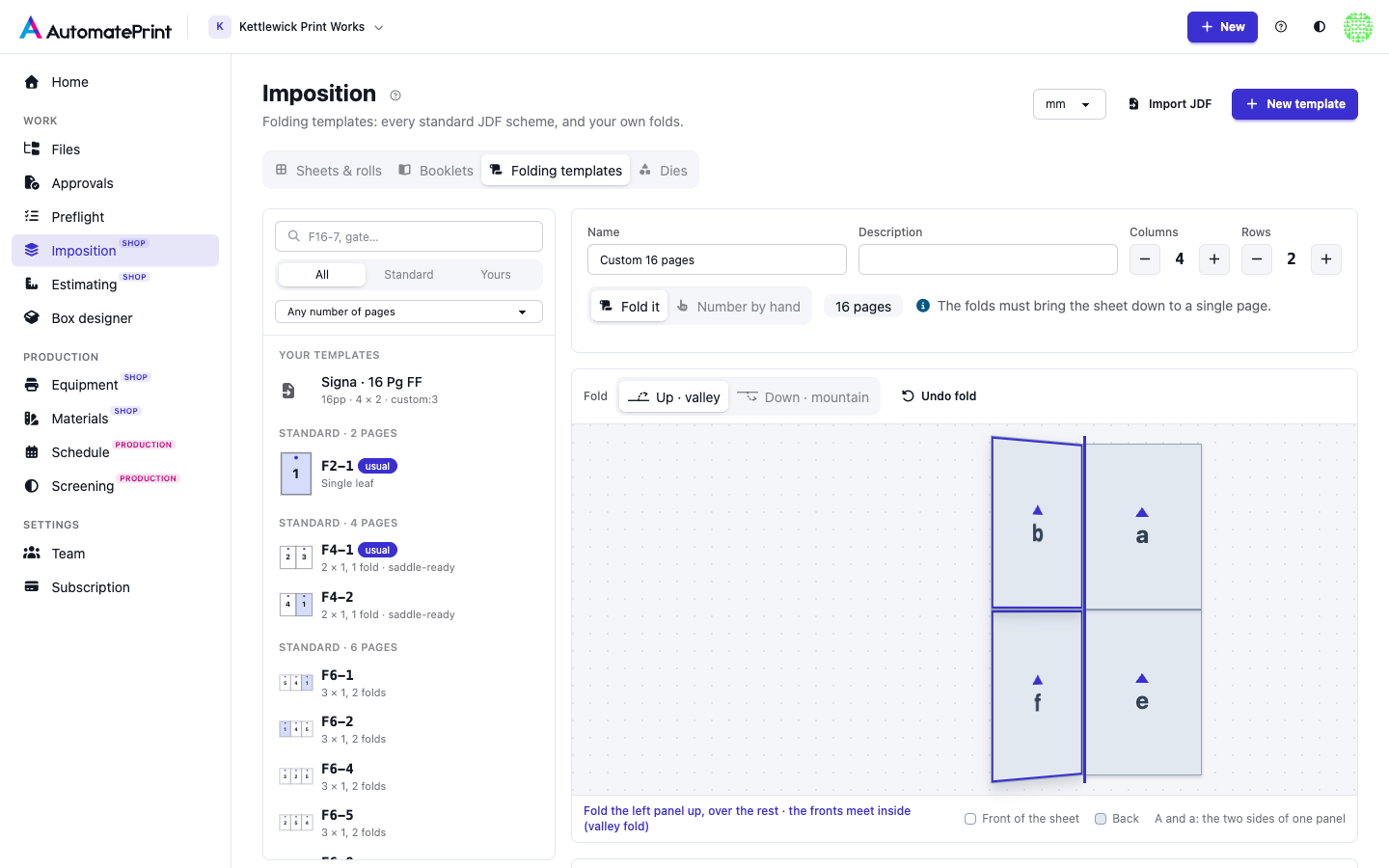
Imposition → Folding templates (Open folding templates) lists every standard JDF scheme Booklets supports, grouped by page count, and your team's own templates. Pick one to see its flat sheet, front and back, with every page's number and head, its folds one by one, and a fold preview you can play.
Standard schemes can't be changed. Their name (such as F16-7) is what you pass as scheme in the
API; Copy name copies it. Clone to edit makes a copy as your own template, with the
same folds, that you can change.
Custom folding templates#
For a fold the catalog doesn't have, choose New template (or clone a standard scheme) and build it one of two ways:
- Fold it. Set the columns and rows. Each line you can fold on is dashed. Point at a line and the panel on your side of it lifts on its hinge, with a sentence saying what will happen: Up brings it over the rest so the fronts meet inside (a valley fold); Down takes it underneath so the backs meet (a mountain fold). Click to fold; the sheet folds in 3D and shrinks fold by fold. Panels carry letters while you fold, A on the front of a panel and a on its back (the back is grey), so you can follow each face; once the sheet is one page they become page numbers, with the page layout and a fold preview. Each fold is listed as a step: flip its direction or remove it (and the folds after it). The lines are also listed as buttons for the keyboard.
- Number by hand. Drag each page number onto a cell of the front or the back, or pick a number and click a cell. Click a placed page to turn it 90°. The two pages of a leaf must share a cell (1 and 2, 3 and 4, and so on).
A saved template appears in the scheme catalog under its name and can be chosen like any other scheme, or passed as
custom:<id>.
Importing JDF templates#
Import JDF (pick the JDF, and its marks PDF if it has one) reads folding and imposition templates exported as
JDF, XJDF or a JDF MIME package (.jdf, .xjdf, .xml, .mjm, .mjd; UTF-8, UTF-16 or the encoding the file
declares, such as ISO-8859-1), such as those from imposition software, and turns each signature it finds into a
template you can fill with any book's pages, up to 40 from one file:
- Folding schemes from
BinderySignature: aFoldCatalogname, itsFoldsteps, or its signature cells (one cell per page, or one cell listing every page with its head direction, as Heidelberg Signa writes it). - Imposition layouts (
Layoutwith signatures, sheets and surfaces, or XJDF placed objects): each page's place, side and head come from its content objects. A layout that matches a catalog scheme, as drawn or turned 180°, is named after it. - Folds worked out from the pages. A signature whose file gives its page layout but no folds (an unnamed fold catalog, or placed pages only) gets the fold sequence that makes exactly that layout, found by trying the folds the grid allows, with the sheet drawn either way up or turned over. It then folds in the preview like any scheme. A layout no fold sequence makes, a sheet of more than 16 pages a side, or a search that takes too long is kept as a hand-numbered template, and the import says so.
- Settings the file states: the sheet size, trim size, trims, lip, paper thickness, binding, work style and the book's signature split (such as 16 + 16 + 8 + 16). Picking an imported template in the editor applies them to the booklet, except the trim size (the PDF sets it) and the split when the book has another page count.
The marks PDF#
Signa and Preps often write a sheet's marks (colour bars, register marks, cut and fold marks, slugs) to a separate
PDF that the JDF refers to, one page per mark layer of each sheet side, drawn in placeholder colours (Signa's B,
C, M, Y, X, Z, All). When the JDF refers to one, the template shows Marks from with the file's name:
- Pick the marks PDF together with the JDF in Import JDF, or Upload marks PDF on the template afterwards. It is kept in Files, under Booklets, and given to every template of that import.
- Map each placeholder to the ink it prints in:
Bto Black,Xto your spot colour, and so on. None leaves it out.Allprints on every separation (registration).
Booklets made with the template print its marks on each form side: the first form takes the file's first signature, front and back. Marks from the JDF template under Marks in the editor prints them instead of the generated marks (the default), on top of them, or not at all. If the marks PDF is later removed from Files, the Checks say so and the forms get the generated marks; upload it to the template again to bring them back.
Imported templates are marked JDF and show the file they came from. Files over 20 MB, and files with a document type declaration, are refused. The import reads the template's geometry only; marks and content come from Booklets.