

A press tells the app how many inks a sheet can take in one trip through the machine, how fast it runs and what makeready, plates and wash-ups cost. Add yours on the Presses tab of Equipment. Wide-format roll and flatbed machines stay on the Printers tab (see Printers).
Note: Which press an imposition job uses
An offset job prints on the press chosen in its Settings…, else the team's default offset press. That press sets its ink limits, plans and plan cost, and the Production card times and prices printing on it. A digital sheet job uses a digital press only when you choose one; otherwise it prints on its printer. See Equipment overview.
Technologies#
| Technology | What it means |
|---|---|
| Offset (sheetfed) | Plates, one ink per printing unit and pass. Units, perfecting and coaters decide how many passes a form needs. |
| Digital: dry toner | Cut-sheet toner press. Process colours are always loaded; white, clear or metallics need a special station. |
| Digital: liquid toner | Multi-shot liquid toner. Each extra colour on a sheet adds a separation, so sheets with more colours run slower. |
| Digital: sheetfed inkjet | Cut-sheet inkjet with a fixed ink set. |
Your team has one default press for offset and one for digital. The first press you add in each group becomes its default; Make default changes it, and archiving the default hands it to the next active press of that group.
Units and perfecting#
- Printing units: offset printing units, or the process stations of a digital press (4, or 7 for 7-colour presses).
- Perfecting: No perfecting (straight), Convertible perfector (switches between straight printing and printing both sides in one pass) or Dedicated perfector (always prints both sides).
- Perfects after unit: on a perfector, the front prints on units 1 to this one and the back on the rest. An 8-unit press that perfects after unit 4 prints 4 colours on each side in one pass, or up to 8 on one side when it runs straight. The settings page sums this up, for example "6 units + coater · perfecting 4/2 · one pass: 6/0 or 4/2".
- Max passes: the most trips through the press one form may take when a job allows extra passes.
- Ink system: Conventional, UV, LED-UV or Hybrid. Dry time before pass 2 (h) is for scheduling only and is never charged. UV and LED-UV cure instantly, so their dry time is always 0.
- Duplex: digital presses that print both sides in one run. Without it, the back is a second run.
Coaters and special stations#
- Coaters are coating units that don't use a printing unit. Each coats the front, the back or both, with aqueous and/or UV coating, and may be flood-only.
- Flood coating from a printing unit lets a flood coating print from a unit when no coater fits.
- Prints spot varnish inline: spot UV or plain varnish plates print from a unit instead of being coated off the press.
- Cold foil units: modules for cold foil.
- Special stations (digital) hold white, clear or metallic toner. Each has a position, the ink it holds now, the
inks it can take and whether it prints under or over the process colours. Enter inks as keys such as
special:white,special:clearorspot:gold. - Fixed inks (digital) are the process set; House inks (offset) are the inks you keep loaded and never wash
out, usually CMYK. Type names or keys separated by commas:
CMYK, PMS 185 C.
Size, speed and makeready#
Min sheet width (mm), Min sheet height (mm), Max sheet width (mm) and Max sheet height (mm) give the sheet range. Gripper edge (mm), Tail edge (mm), Left edge (mm) and Right edge (mm) are the edges the press can't print on.
Speed (sheets/h) is sheets per hour on offset, and sides per hour at your usual sheet size on digital. Makers publish digital speeds for A4 or letter pages, and larger sheets run slower. Perfecting speed (sheets/h) applies when a form perfects. Separations per minute is for multi-shot presses; it gives the speed when Speed is empty.
Makeready per pass (min) and Makeready per plate (min) are the setup time of each pass and each plate. Makeready sheets per pass and Makeready sheets per plate are the waste sheets they use. Wash-up per ink change (min) is the time to wash a unit for a new ink, and Special station swap (min) the time to change a digital special station.
Costs#
Presets never include costs, so enter your own:
- Hourly cost is what an hour of the press costs you. Plans use it to price makeready, running and wash-ups. With no hourly cost, plans only count plates and paper, and the settings page shows a banner saying so.
- Hourly rate and Minimum charge are what you charge, and only affect prices on quotes.
- Plate cost is per plate, meaning one ink on one side. Custom ink charge is per ink that isn't a house ink, per form.
- Click cost, mono, Click cost, colour and Click cost, special are per printed side on digital presses.
How press time and cost are estimated#
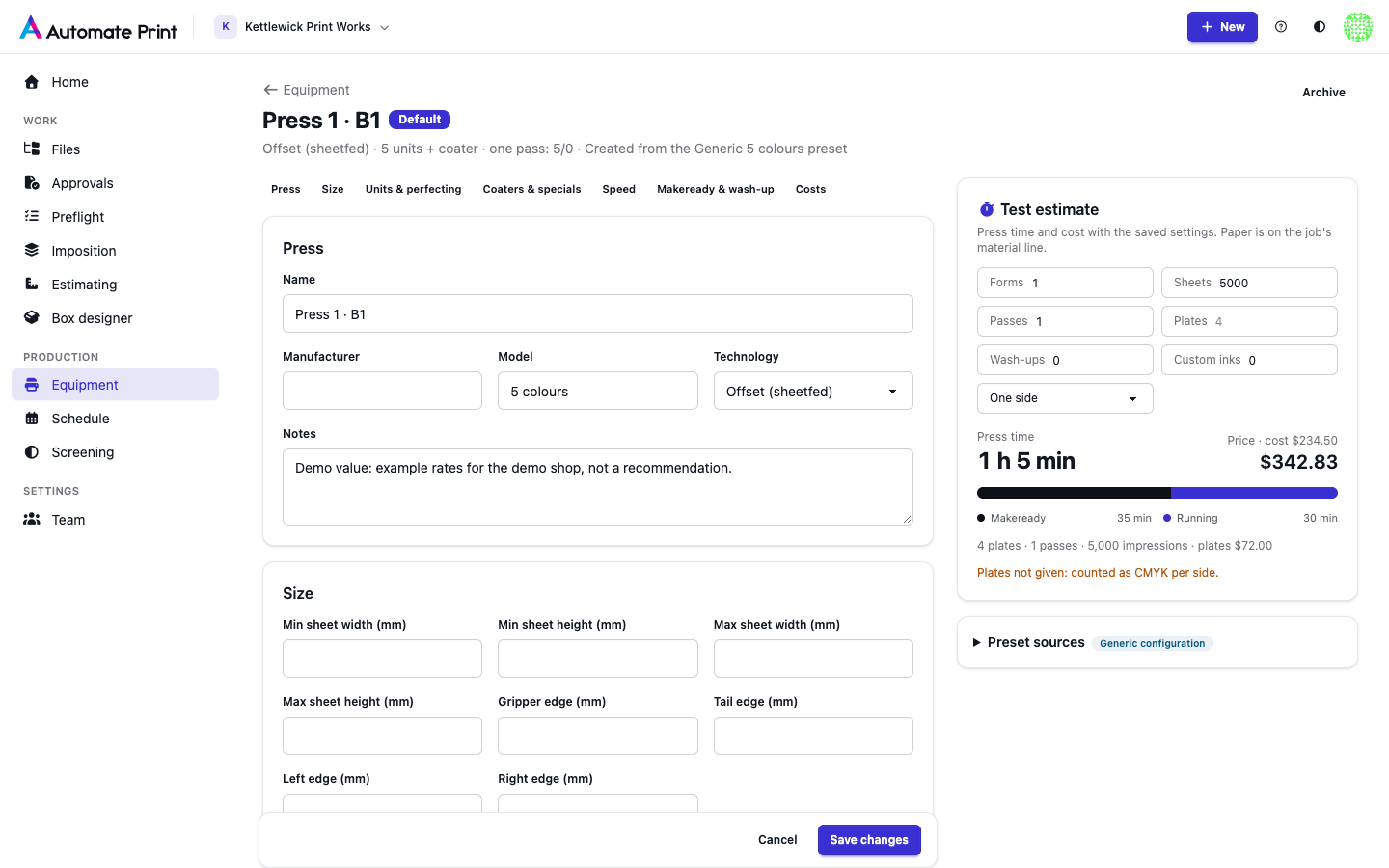
On offset, each form adds passes × Makeready per pass plus plates × Makeready per plate. Running time is impressions ÷ speed. An imposition plan gives each form's impressions (each pass prints the run plus its own makeready sheets); otherwise, as in Test estimate, impressions are passes × sheets. Wash-ups add their minutes. The cost is hours × hourly cost plus plates × plate cost plus custom inks. The price is hours × hourly rate plus the same plate and ink money, and never less than the minimum charge. When a form's plates aren't known, the estimate counts CMYK on each printed side and says so. On digital, each form adds one makeready, running time is printed sides ÷ speed, and clicks are added to cost and price. Paper is never part of press cost: it is on the job's material line.
Example: an imposition plan's form with 2 passes, 6 plates, 612 sheets and 918 impressions (the plan's count), with $30 plates, 20 minutes' makeready per pass, an hourly cost of $180 and 10,000 sheets/h. That is 40 minutes of makeready plus 5.5 minutes of running, so the press cost is $136.52 + $180 of plates = $316.52. Test estimate with the same form counts 2 × 612 = 1,224 impressions (7.3 minutes of running): $322.03.
Test estimate on the settings page runs this with the saved settings. On offset you enter forms, sheets, passes, plates, wash-ups, custom inks and sides; on a perfecting press, Perfecting times the sheets at the perfecting speed (on by default for a dedicated perfector, and for a convertible one when both sides print). On digital, Black only charges mono clicks.
Presets#
Add press offers generic configurations (4 colours + coater up to 10-colour perfectors) and published models. Every preset value shows where it comes from:
| Badge | Meaning |
|---|---|
| Manufacturer data | From the maker's own page, checked on 2026-09-27. |
| Derived from maker data | Worked out from a published number, for example 95 pages a minute × 60 = 5,700 sides an hour. |
| Secondary source | From a secondary source or a used-press listing. |
| Generic configuration | Defines a generic preset, not a maker's figure. |
| Unverified | Not copied into your press: enter it from your press's spec sheet. |
Unit counts, perfecting splits and special stations are common configurations of a model line, so check them against your press. Each copied setting keeps a small badge with its source on the settings page.
Guillotines#
N-up and strips sheets are cut on a guillotine, not a cutting table. See Cutting machines.