

A quick quote is an estimate built from parts you size by hand instead of tracing them on a drawing. Type a name, a size and a quantity, pick a stock and a route, and the line prices. Use it for work that has no artwork yet: three posters at 24 × 36 in, 500 postcards at 4 × 6 in printed both sides, 2,000 flyers that might run offset, and a design fee on top.
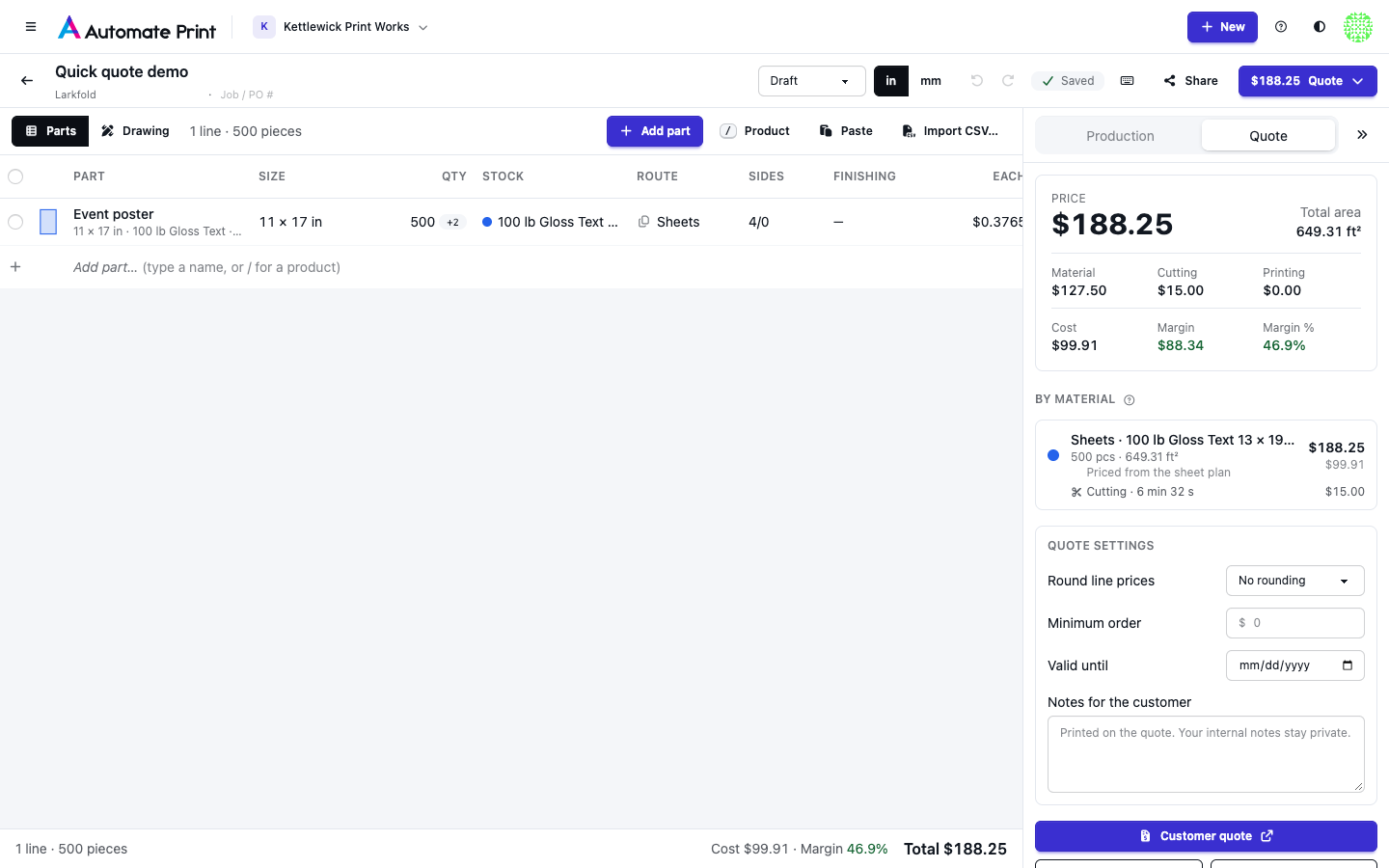
A quote in one minute#
On the Estimating page, press N then Enter: a new quote named "Quote untitled · (today’s date)" opens
with the cursor in the first part's name. Then, keyboard only:
- Type
poster w, press↓andEnter: the Poster (wide format) product fills the row (24 × 36 in, 5, Roll) and the cursor moves to its size. Tab, type3,Tab, typesatin,Enter: three posters on your satin roll, priced at once.⌘Enteradds a row. Typepostc,↓,Enter: a Postcard row (4 × 6 in, 500 with two more quantities to compare, your 14pt stock on Sheets, 4/4). It prices a moment later.⌘Enter,fly,↓,Enter,Tab,2000,Tab,100# gl,Enter: 2,000 flyers on 100 lb Gloss Text. When the same paper exists on a bigger sheet, the line offers "Offset alone $X · Switch".
That's about 70 keystrokes. On a team that has set nothing up yet, the same keys still give three rows: each shows what it's missing ("Set a price", "No press for this route") and the Ready to quote strip lists it (below). Typing a price into Each finishes any line.
Three kinds of part#
Every line of an estimate is a part:
- Drawn: traced over a page of an uploaded drawing and sized by its scale (see Takeoff: tracing parts).
- Sized: no drawing. You enter the shape (rectangle, rounded rectangle or oval) and the width × height. Areas and perimeters are exact: an oval 12 × 8 in has an area of 75.40 in².
- Price only: a line with no size, such as a design fee or outsourced foil stamping, priced by hand.
- Box: a folding carton or corrugated box sized length × width × depth (
2.5x1.5x6), drawn as a real dieline by the Box designer. Start one from a box product such as Tuck box, Tuck box, short run or Shipping box; its details say how it is made (die-cut, cutting table or flexo folder-gluer; see Cartons and boxes).
An estimate can mix them all. One with no drawing opens straight in the parts grid.
Starting a quick quote#
New estimate (or N on the Estimating page) asks how you want to start: Quick quote (type sizes, quantities
and stocks; no artwork) or Measure a drawing (upload a PDF or image). The name is optional: a quick quote left
unnamed is called "Quote (customer) · (date)", and you can rename it at the top of the estimate.
An estimate opens in the Parts view when it has no drawing and in the Drawing view when it has one. Switch with
the Parts · Drawing buttons or G (⇧⌘G while you're in the grid). Add a drawing later from the Drawing view; the
lines you typed stay.
The parts grid#
Each row is one line: Part (with a generated description under it), Size, Qty, Stock, Route, Sides, Finishing, Each and Total. Below 1,280 px wide, Sides and Finishing fold into the description line. On a phone the grid is a list of cards: tap one to edit it full screen, + adds a part, and the total at the bottom opens the Quote panel.
The grid works like a spreadsheet:
| Keys | Does |
|---|---|
| Arrows | Move between cells |
Typing, Enter or F2 |
Edit the cell (typing replaces what's there) |
Enter / Tab while editing |
Save and move down / to the next cell; past the last cell a new row starts |
Esc |
Cancel the edit (a row you just started and left empty goes away again) |
⌘Enter or ⇧Enter |
Add a row below; it copies the route, stock, sides and finishing of the row above |
/ in an empty Part cell, or ⌘K |
Pick a product |
Space |
Open the row's details |
⇧Space, ⇧↑ ⇧↓ |
Check rows |
⌫ |
Delete the checked rows, or clear an optional cell |
⌘⌫ |
Delete this row (Undo in the message puts it back) |
⌘D |
Duplicate |
⌥↑ ⌥↓ |
Move rows; while editing a size, open the size presets |
⌘Z, ⇧⌘Z |
Undo, redo |
Everything also has a button or a menu item (the ⋯ menu at the end of each row).
- Part: start typing a product's name and a list of matching products appears;
↓thenEnterapplies one.Tabkeeps what you typed as a plain name. - Qty:
5000,5,000,5kor2.5k. Type500, 1000, 2500(or500/1000/2500) to quote two more quantities. - Stock: search by name, SKU or weight:
100# glfinds 100 lb Gloss Text,14ptfinds 14pt C2S Gloss Cover. Stocks that suit the row's route come first; others follow under "Other routes", and picking one switches the route ("Route changed to Sheets"). The same paper in several sheet sizes is one entry with size chips. Add from presets and New stock… are at the end. - Route:
R,S,OorCwhile the list is open. Changing the route keeps the stock when it fits the route and its press, or moves to the same paper in a sheet size that does ("Stock changed to …"). - Sides:
4/0,4/4,4/1,1/0,1/1or a spot colour such as4+PMS 185 C/1;44means 4/4 and40means 4/0. On a roll: 1 side, 2 sides or not printed. - Each: type a price to override the line (it shows "override"); clear it to go back to the computed price.
Each part says how it is produced:
- Roll (wide format): printed on a roll and priced by area, or by the roll it nests on.
- Sheets (digital / flatbed): laid out on the stock's sheet, printed on a digital press or a flatbed printer, then cut on a guillotine or a cutter.
- Offset: ganged onto offset forms with plates, makeready and overrun. An offset carton is planned on its own: ups on the press sheet, die-cutting, folding and gluing, and its die.
- Blanks (made to size): boxes only: corrugated made to size, converted on a flexo folder-gluer or die-cut, or priced as board only by the blank's rectangle.
- Custom price: your cost and price per piece, typed by hand.
Parts on the same route and stock are produced together, so ten postcards on one stock share sheets. See Sheet and offset pricing.
Sizes#
The size cell reads what you type: 24x36, 8 1/2 x 11, 3'x6', 148x210mm, A4, Tabloid, 3 in circle or
3.5x2 r0.125 for rounded corners. Sizes without a unit use the estimate's units. Each product lists its usual sizes
first.
Folded pieces#
Folded work is quoted at its flat size with a Fold finishing line. Pick the fold style (half, letter, Z, gate, double parallel, roll or 4-panel accordion) and give the finished size: a letter fold of 3.6667 × 8.5 in is 11 × 8.5 in flat. On cover weights the app suggests adding a score; it never adds one for you.
Quantities and prices#
The quantity is what the customer orders and counts in the total. Up to three other quantities can be quoted on the same line ("or 10,000 at …"); they never count in the total. Any line takes a hand price per piece, so a line that can't be priced yet (no stock price, no press) can still go on the quote.
Boxes in about a minute#
Once box quoting is set up (below), two keyboard-only quotes:
- 2,500 tuck boxes:
⌘Enter,tuck,↓,Enter(the Tuck box product, on Offset), then in the Size cell2.5x1.5x6,Tab,2500,Enter. The line prices in a few seconds the first time (the ups search) and shows its die under the total: "+ $… New cutting die" and its ups. - 500 shipping boxes:
⌘Enter,ship,↓,Enter,12x10x8,Tab,500,Enter. The details show the price per MSF of board.
On a team that has set nothing up, both lines show their plan (blank, ups, sheets) and what is missing at once, and Each takes a hand price. The Ready to quote strip offers Set up carton quoting: 14 values (about a minute of typing) or Set up corrugated quoting: 6 values; see Cartons and boxes.
Row details#
Space (or Details in the ⋯ menu) opens a row's rarer settings: the shape (rectangle, rounded with its corner
radius, or oval), the bleed (the group's, or its own), up to three more quantities with their prices, the route
compare with Switch, a hand price or a target margin (price = cost ÷ (1 − margin)), notes, and for a custom line its
cost and price each with the markup and margin. A folded piece has the Finished size → flat helper: enter the
finished size and the fold, and Use flat size writes the flat size into the row. A box row has the Box section and
Make (how it's made, versions, the die, how tooling is billed; see Cartons and boxes).
Save as product… in the ⋯ menu keeps the row's size, quantities, route, stock, sides, finishing and notes as a product for next time (see Products and finishing).
Paste rows and import a CSV#
Copy rows from a spreadsheet and press ⌘V in the grid, or use Paste or Import CSV… above it. A dialog shows
the rows with their columns matched by header (name, size or width and height, qty, qty2 and qty3 as more quantities,
stock, sides, route, price, notes), or guessed from the contents when there's no header. A "Unit" column (ea, box)
isn't read as the price. Each row shows its own problems ("Stock matches 2 materials: pick one", "No size: added as a
custom price line"); a price on a row with a size or stock becomes a hand price, and a route the stock can't run on
follows the stock instead. Add N parts adds the rows without errors in one step (one Undo). Up to 500 rows.
Editing several rows#
Check two or more rows to get a bar above the grid: set the stock, route, sides or quantity, add or remove a finishing operation, duplicate or delete. Rows that can't take a change (a drawn part's size, an item's stock) are skipped and the message says how many.
Ready to quote#
While something the lines use is missing, a strip above the grid says what: stocks with no price (Set prices asks for them all at once, and adds the stocks your products suggest), no press for Sheets or Offset (Add a press), equipment without rates (Set rates), lines with no stock (Add suggested stocks when their products name one), and box lines waiting for their press, machines or rate cards (Set up, one dialog for the whole family). Price by hand jumps to the first line without a price; a line with a hand price and no stock no longer counts. Nothing is created behind your back: presets are only offered.
Totals and quote settings#
The footer shows the lines, pieces, cost and margin, and the total. The Quote tab adds the groups by route and stock, the custom lines and the quote settings:
- Round line prices: no rounding, or each line up to the next $1, $5 or $10.
- Minimum order: the total is never less than this.
- Valid until, and Notes for the customer (printed on the quote; your internal notes stay private).
With the example lines of 24 × 36 in posters, 12 × 8 in ovals, a $75 design fee and foil stamping at 500, the quote totals $341.28; rounding each line up to $5 makes it $345.00, and a $500 minimum makes it $500.00.
The customer quote#
Customer quote on the Quote tab opens a clean page to print or save as PDF: your company, the customer, reference, date and validity, each item with its description, quantity, price each and total, "or 10,000 for …" rows for the other quantities (not added to the total), a "One-off: cutting die" row under a box whose die is billed separately, and your notes. It never shows costs, margins, routes or production details. View as customer hides your staff buttons. Lines still being priced show "Price to follow"; Price now prices them. A designer link has the same page (see Designer links for customers and staff).