

A mark on a booklet press form can follow the booklet rather than the sheet: a signature ID code on every spine, a stepped collating mark, a "Sig 3 · pp 33–48" slug under each signature, a folio check mark on every page. You set this in the marks editor with Attach to, Repeat on every and Prints on. The marks move with the signatures when the layout changes, on every form and both sides.
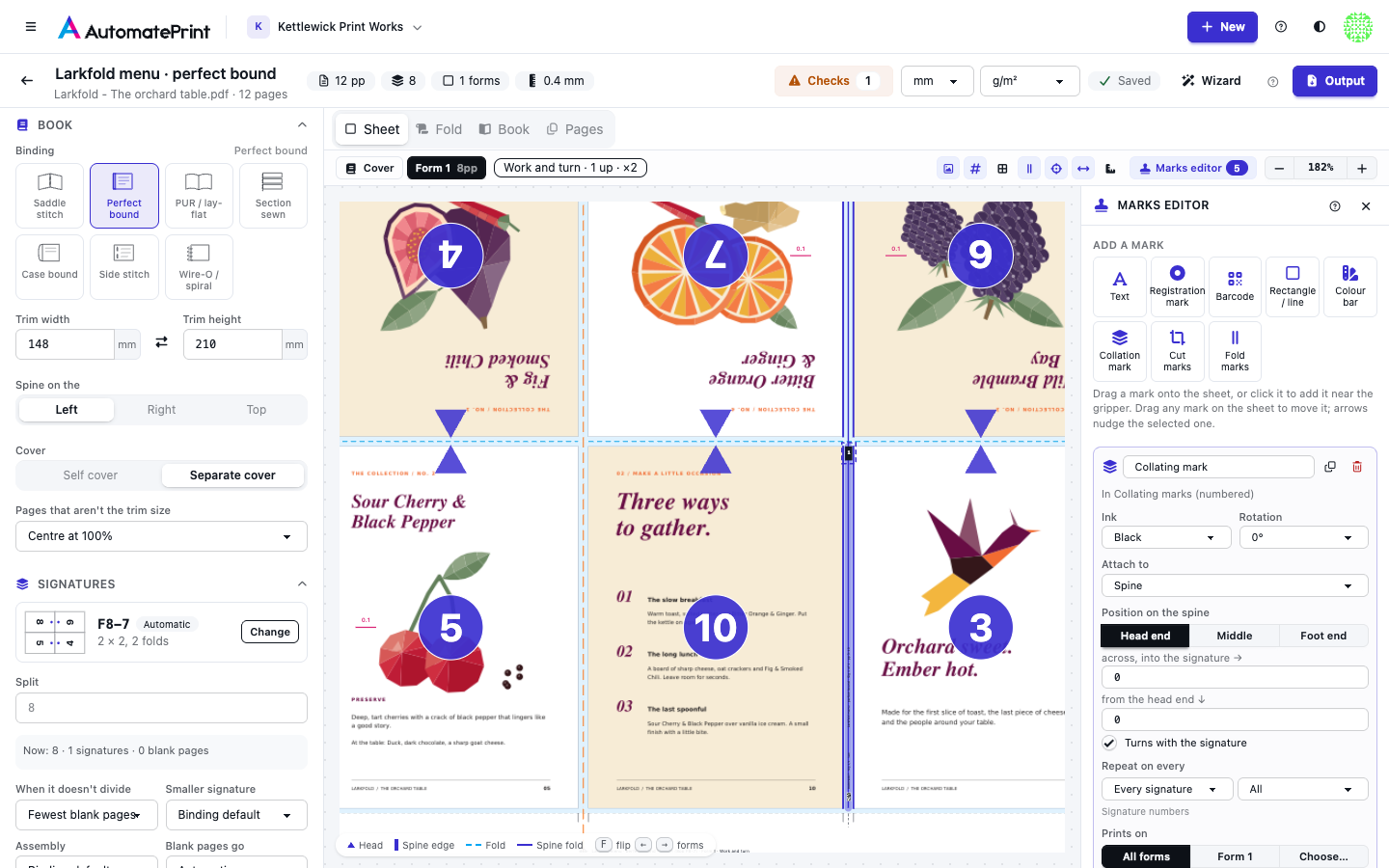
Attach to#
| Attach to | What the mark is measured from |
|---|---|
| Sheet | The press sheet's edges, as before (the default for marks you drop on the sheet) |
| Gripper edge | The non-printing band at the gripper, as the side is printed |
| Side guide | The left side band, as the side is printed |
| Signature | The trim box of each signature on the sheet (every page of its block) |
| Page | The trim of each page |
| Spine | The outer spine fold of each signature, on the side that shows it (the side with its first page) |
| Fold line | Every fold of each signature |
| Cut line | Every trim line of each signature: its head, foot and face trims and the cuts between its pages |
The sheet outlines what the selected mark is attached to: each page or signature it prints on, each spine, fold or cut line, or the gripper or side guide band.
The position grid speaks the language of what the mark is attached to. On a signature or a page it reads Head / Foot × Spine side / Face side, so a mark at Foot, face side stays at the foot and the face of every page, whichever way the page is turned on the sheet. A signature's spine and face sides follow its first page on that side: the face side is that page's outer edge. On a line the grid has three points, Head end, Middle and Foot end, three buttons (a line running across the signature: its face end and spine end). The two offsets move the mark in from the anchor, toward the face or the head on the middle row and column; on a line the first offset moves it across the line, into the signature, and the second along it.
Turns with the signature (or with the page) keeps the mark's top toward the head, so head-to-head pages and signatures turned on the sheet get their marks the right way up. The Rotation turns it further (90° lays text along a spine). Untick it to keep the mark upright as the sheet is printed.
Note: Page marks follow their page
Marks attached to a page now turn with the page (head-to-head pages included) and read spine / face rather than left / right, and they move with the page's creep shift. Tick Fixed in creep under Advanced for a mark that must not move, such as a code read by a camera. Marks on signatures, spines, folds and cut lines never move with creep.
Drop a new mark on a spine in the Sheet view and it attaches to every signature's spine; drop it on a page and it attaches to that page (the filter names its page number, so change it to All for every page). A Collation mark always goes on the spines.
Repeat on every#
A mark on a signature, spine, fold or cut line prints Once (the first one on the sheet) or on every signature, spine or line. A page mark prints on every page. The filter beside it picks which ones:
- All, First, Last: first and last count the whole booklet (signature 1 and the last signature, page 1 and the last page); folds and cut lines count 1, 2 … in each signature.
- Odd and Even: by signature number, page number or line count. Odd pages are the rectos.
- Outer and Inner: the outermost or innermost signature of a nested (saddle-stitched) section; in a gathered book every signature is both.
- Spine folds and Cross folds (not the spine) on fold lines; Trims (the signature's edges) and Cuts between pages on cut lines.
- Numbers…: a list like
1-3,7.
Prints on#
Forms, sides and Mirror left to right on the back work as on any mark (mirroring applies to marks on the sheet; a mark on a page, signature or line already follows it on the back). Two more choices:
- Signatures:
all,first,last,odd,even,every:2or numbers like1-3,7. A mark on the sheet prints on a form holding any of those signatures. - Cover or text: Both, Text forms only or Cover only (the separate cover's form).
Collating marks#
A Collation mark on the spine is a bar that steps down the spine from the head end, one step per signature, so a gathered book shows a staircase on its back and a missing or doubled signature breaks it. Steps with each Signature uses its place in the gathered stack (signatures nested in one section share a step); Form steps per press form, as on Imposition sheets. Starts at the head or foot end, Step and Bar length set the staircase, and Print the signature number in the bar knocks the number out of the bar in paper white.
Advanced#
- Overprint prints the mark over the inks below it.
- Knock out behind the mark clears a 1 mm paper-white box behind it.
- Clip: Never into the pages cuts off any part of the mark inside a page's trim; Never off the sheet cuts off what runs past the sheet edge.
- Fixed in creep (page marks): see above.
- Only when… prints the mark only when a condition holds, per signature or page:
signature.last,page.recto,not signature.is_cover,sheet.side == 'front'. See Order data in marks.
Signature and page values#
Text and barcodes can print these, besides the job, form and booklet values (Order data in marks):
| Value | What it prints |
|---|---|
signature.number, signature.count |
The signature's number and the number of signatures (0 on the cover) |
signature.name |
Sig 3 (Cover on the cover's form) |
signature.pages, signature.first_page, signature.last_page, signature.page_range |
Its page count and pages, such as 33–48 |
signature.scheme |
Its folding scheme |
signature.section, signature.depth, signature.gather_number |
Its gathered section, its depth in a nest (0 outermost) and its place in the gathered stack |
signature.last, signature.is_cover, signature.face |
Yes / no values, and outside (the side with its first page) or inside |
fold.kind, fold.index |
On a fold line: spine, head, foot, face or side, and its count |
page.number, page.leaf, page.signature_page, page.blank, page.recto |
On a page mark |
sheet.side_letter, sheet.work_style |
F or B, and the form's work style |
job.ref |
The booklet's short reference for codes: the first 8 characters of its id, such as 3F2A91C4 |
Signature values are there on marks attached to a signature, a line or a page, and on a sheet mark when its form holds one signature; elsewhere they print as missing data.
Examples#
The booklet presets are ready sets of these: a signature ID code, numbered collating marks and a slug on every spine, folio checks, lay marks, and cut and fold marks. By hand:
- Signature ID on the spine: a Code 128 barcode attached to Spine, Middle, rotation 90°, encoding
{{ job.ref }}-{{ signature.number }}, on every signature. - Collating marks: drop a Collation mark: numbered bars stepping down every spine.
- Cut and fold marks: drop Cut marks or Fold marks: a tick beyond each end of every line.
- Signature slug: text
Sig {{ signature.number }} · pp {{ signature.page_range }}attached to Signature, Foot, middle, with the offset set to a negative distance so it sits just below the foot trim. - Folio check marks: a small rectangle attached to Page, Head, face side, on every page, with Clip: Never into the pages.
Marks print in the press forms PDF's Marks layer with the job's real data, like the rest of your sets. In a JDF package they are drawn into the marks file with the bindery marks, one flattened mark object per side.
To try a set outside a job, the marks designer previews it on Booklet: a made-up press form with sample signature and page values.