

On a roll label press the web carries several lanes, one label wide. After printing, the web is slit, and each lane is rewound into its own rolls. Label lanes plans a roll job that way: which item runs down which lane, the frames the press prints, and the finished rolls. It's set up by the New job wizard for labels on a roll. On any roll job, open it from Label lanes in the workspace header.
The label on the web#
Width (across) and Height (around) are the label as it sits on the web. Lanes across is how many run side by side, with the Gap across between lanes and the Gap around between labels in a lane. A row is one label in every lane. The lanes are centred on the roll. The first time you open Label lanes it suggests these from the job's first item and its strips settings, and the frame and the most lanes from the job's printer (see The press's limits): check them, then press Plan the lanes. After that, every change saves and plans again.
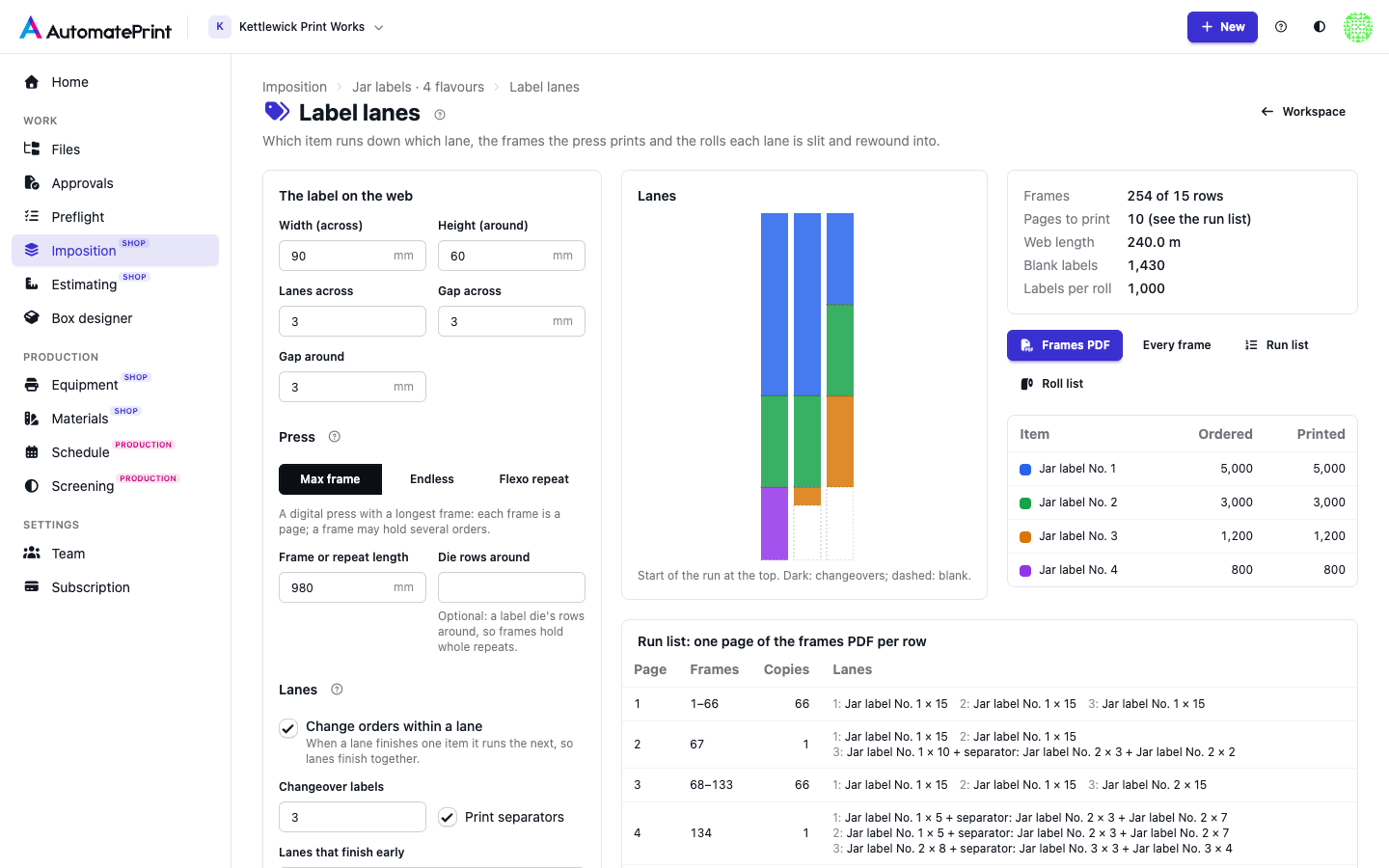
Frames: max frame, endless or flexo#
- Max frame: a digital press with a longest printable frame. Each frame holds as many rows as fit in the Frame or repeat length. With Die rows around, the label die's rows around its repeat, a frame holds whole die repeats. A frame may hold the end of one order and the start of the next.
- Endless: a press without a frame limit. Each frame is one row, so each run of identical rows is one page with a copy count.
- Flexo repeat: a flexo press. The frame is the plate cylinder's repeat, with as many rows around as fit. A plate prints the same thing for the whole run, so each lane runs one item, and lanes that finish early keep printing their item as overs. Plate distortion is applied when the plates are made, not here.
The run is rounded up to whole frames. Identical frames in a row are one frame run: one page of the frames PDF, printed that many times.
Separations per frame is how many inks each frame prints: 4 for CMYK, 3 in an HP Indigo's EPM (CMY only), and one more for each hit of white or each special ink (CMYK with two hits of white on clear film: 6). Of them white or special says how many of those come from white or special stations. They decide the clicks, the ink and, on a multi-shot press, the speed.
The label press#
The job's label press (the one chosen in the wizard, else your team's default label press) has a frame (a maximum frame and its length, or endless), a print width, a widest web and the most lanes its slitter cuts. Label lanes starts from them:
- The first suggestion takes the press's frame and length, and no more lanes than its slitter cuts. Without a label press it suggests an endless press.
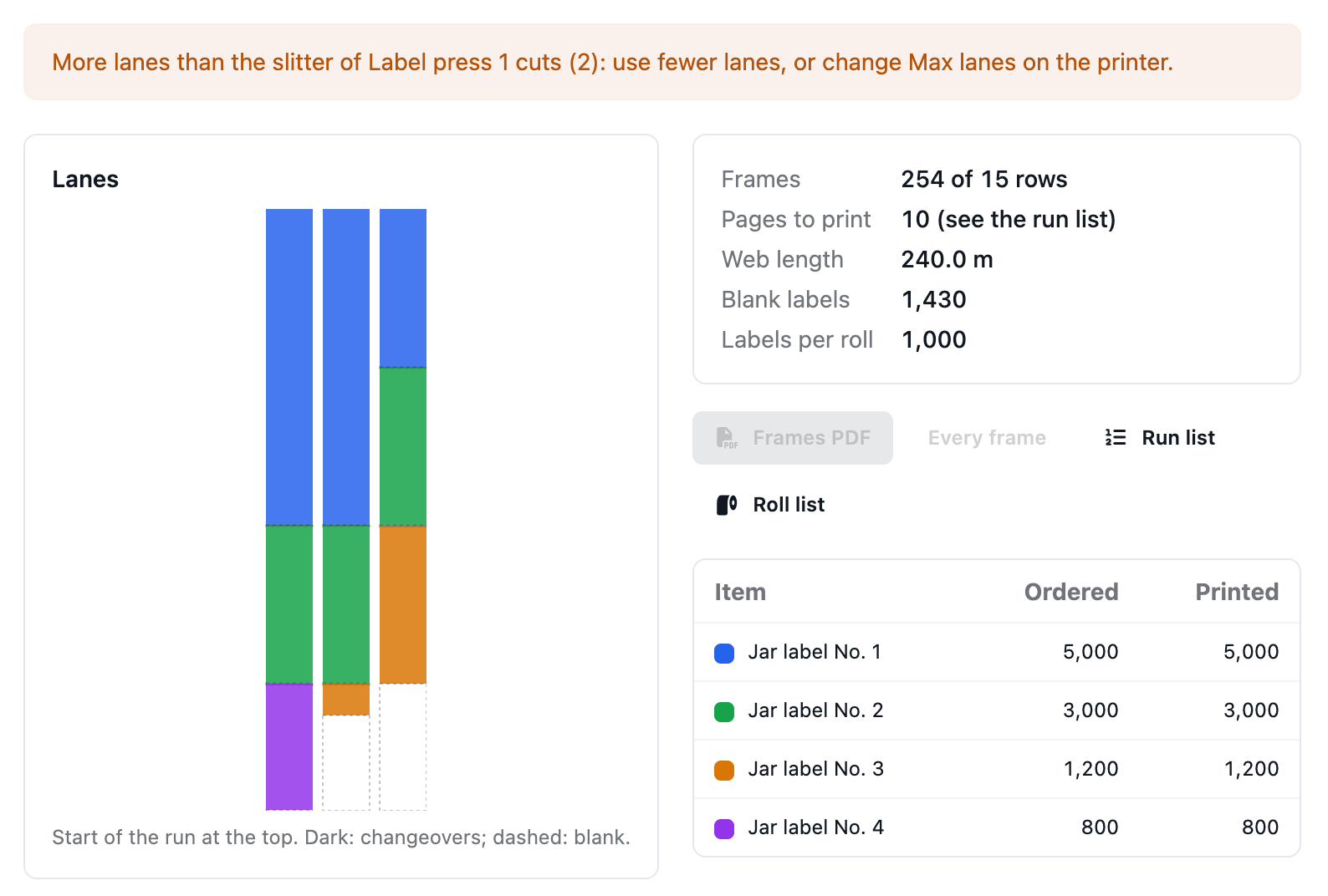
- With more lanes than the slitter cuts, labels across wider than the press prints, or a roll wider than its web, the plan says so. The lanes are still planned, so you can see them, but the frames PDF waits until they fit the press.
On an HP Indigo every frame costs its separations in clicks however much of it is used, so fill the frame: Label lanes puts as many rows in each frame as fit. With an inline full-rotary die, use Die rows around so frames hold whole die repeats; a semi-rotary or laser die-cutter takes any frame length.
What the run costs#
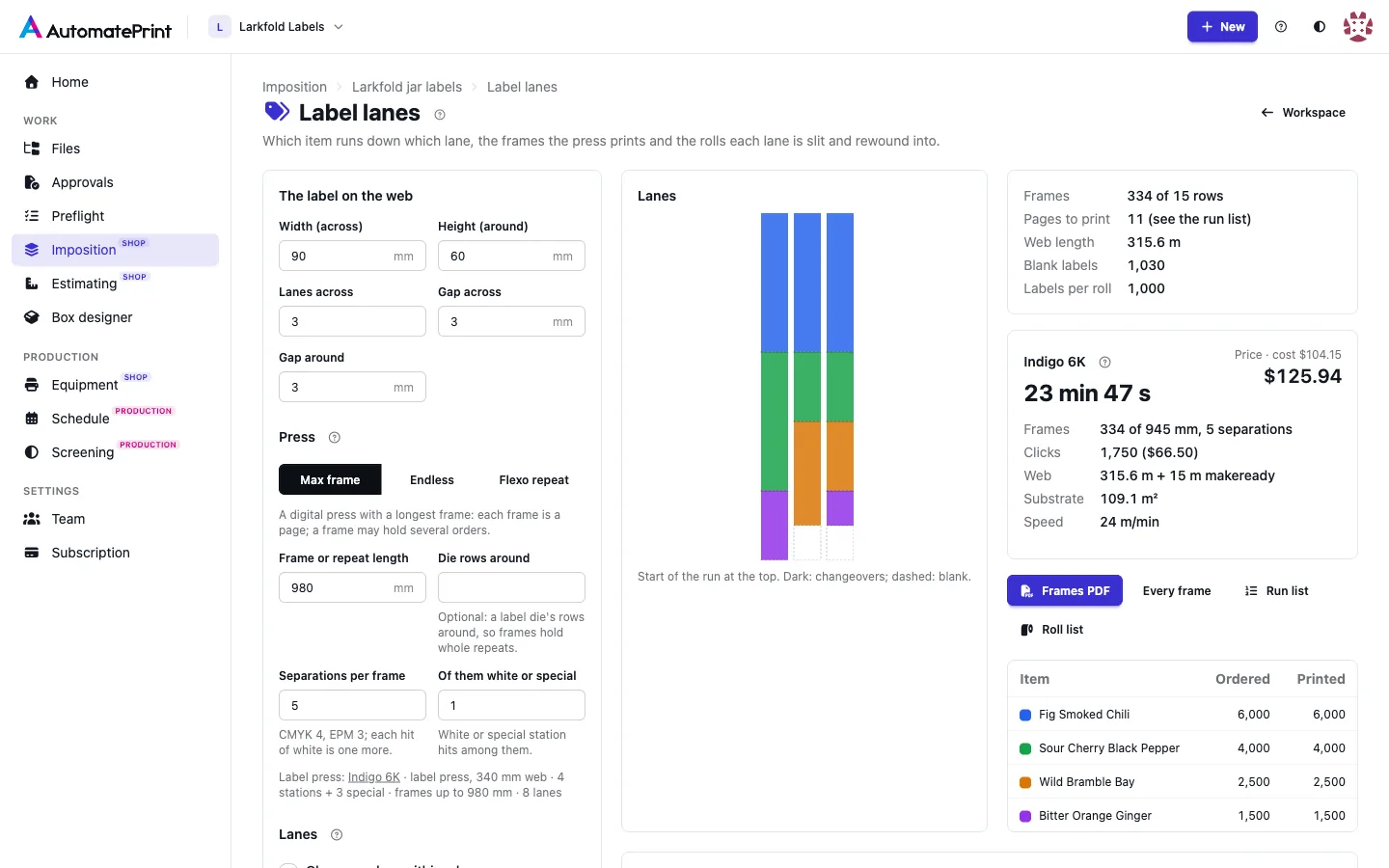
With a label press the plan shows the press time and price of the run: its frames and separations, the clicks (per frame or per metre) or the ink by printed area, the web with the press's makeready web, the substrate area, the speed, the cost and the price, worked out as described in Presses: offset, digital and label presses. It warns when the press has no web speed, click cost or ink cost to price with. Paper is not in it: it is the job's material.
The workspace's Production card shows the same run when the job's press (in Settings…, or the press picked in the wizard) is a label press: under Printing it names the press, gives the press time and price with the makeready and running bar, and a line with the frames, clicks, metres of web and ink. The Report's print time and price come from it too, instead of the wide-format printer's. It prints this plan's frames when the job has Label lanes settings; on a roll job without them it cuts the layout's used web into the press's longest frames (one frame on an endless press) and counts four separations. A roll job on no press, or on a press that isn't a label press, still prints on the printer.
Changing orders within a lane#
With Change orders within a lane (digital presses), a lane that finishes one item runs the next, so the lanes finish together and the web is as short as it can be. Between two items a lane gets Changeover labels, blank labels the finishing line uses to find the change. With Print separators each one reads "Next:" and the next item with its quantity. An item may be split over two lanes; without a roll size it is split where the lanes balance, and an item never starts at the very end of a lane with just a few labels.
Without lane changes each lane runs one item for the whole run. An item with more lanes is spread evenly over them, and spare lanes go to the item whose lanes run longest. This needs at least as many lanes as items.
Lanes that finish early end in Blank labels or Extra copies (overs) of the lane's last item.
The job's imposition#
The job's layouts follow the same frames. With a Max frame or a Flexo repeat, the roll is cut into frames of that length and no label crosses one: Strips in lanes stops each lane at the end of a frame and goes on in the next. Each frame is one page of the imposed PDF, so a digital press prints frame by frame. The lanes follow Change orders within a lane: a lane runs one item, then the next, with room for the Changeover labels before each new item (see Lane changes). The separators' text is printed on the frames PDF here, not on the imposed PDF. A flexo repeat keeps one item per lane. On an Endless press the layout is one long roll. Run the job from the workspace to impose it.
Rolls and the wind position#
Labels per roll cuts each lane into finished rolls of that many labels of one item; the last roll of an item is short, and a changeover always starts a new roll. A lane's overs (extra copies, or a flexo plate's run past the lane's labels) first fill its last roll up to the roll size, then make rolls of that size of their own. A plan lists up to 20,000 rolls; with more, Label lanes asks for more labels per roll. Instead, Or max diameter works out how many labels fit: π × (diameter² − core²) ÷ (4 × label pitch × thickness). Rolls go to lanes whole, longest first, so with large rolls the lanes may not finish together. With a Core and a Thickness (label and liner) each roll shows its diameter.
The Wind position is the customer's: 1 to 4 wound out (labels outside), 5 to 8 wound in, with the top, bottom, right or left edge of the label coming off the roll first. It turns the artwork on the web so that edge leads. Each rewind of the printed web reverses which end comes off first: Slit and rewound off the press (the press winds the printed roll, a slitter-rewinder makes the rolls) keeps the edge that led through the press first, and Finished rolls straight off the press puts the trailing edge first. A wind position that turns the label a quarter also turns its cell: when an item no longer fits, Label lanes says so; swap the width and height.
Example: four items of 5,000, 3,000, 1,200 and 800 labels of 3 × 2 in, 4 lanes, 0.125 in gaps, a 38.5 in maximum frame (18 rows) and 3 changeover labels. With lane changes the lanes run about 2,503 rows (167 frames); in one order per lane they would run 5,000.
Files#
- Frames PDF: one page per frame run, the roll's width by one frame, each label's artwork centred in its cell. Pages run with the leading edge at the top. Each artwork is embedded once however many cells it fills, as in the imposed PDF.
- Every frame: one page per frame in print order, for front ends that can't repeat a page. A PDF draws up to 100,000 labels (pages × rows in a frame × lanes); beyond that, download one page per frame run.
- Run list (CSV): each page with its first and last frame, its copies, and what each lane holds.
- Roll list (CSV): each lane's rolls with item, "roll 2 of 5", labels, length and diameter.
The page also lists each item's ordered and printed labels, the run list and the rolls.
In the API#
The job's label_settings (lengths in points) holds these settings and is written with the job's PATCH; null means
the job isn't a label job. GET …/jobs/{id}/labels/ returns the settings with their defaults, the artwork's turn,
fit warnings, the plan and estimate (the label press's estimate of the run, null without a label press);
labels/frames-pdf/ (with ?expand=1), labels/run-list/ and labels/rolls/ return the
files. See the imposition API reference.